Making a Parallel Hash Map. Should you even try?

A lot of people have tread this ground before, is there really anything left to add?

There’s a lot of open source hash map implementations out there already. For example, here’s a fairly comprehensive benchmark on a bunch of them: Comprehensive Hash Map Benchmark. That benchmark compares insert, erase, and lookup performance across 15 different hashmap implementations that are written in both C and C++. I’ll be honest, if you’re thinking about implementing your own non-threadsafe version of a hash map. You really shouldn’t bother unless you have a very specific requirement that isn’t handled by an open source project. But if there’s one thing you can definitely gleam from that benchmark, std::unordered_map is significantly slower than the top-contenders for hash map implementations.

But when it comes to Parallel Hash Maps, there’s less tread ground for benchmarking.

One article I found related to parallel hash map performance was written here: PHMap Performance. Then the hash map from that article is compared against another parallel hash map written here: Parlay Hash Map. Which then compares itself against another parallel hash map written here: Folly Concurrent Hash Map. Parlay Hash Map says it’s the best, but is that really true? Many times you can find yourself in a situation where your particular constraints allow you to optimize in ways you can’t for something that needs to be released to a general audience. Or you just have project requirements that are broken by a particular implementation.

That being said, I was still inspired to try writing my own parallel hashmap implementation to see if I could implement something better than other open source projects for my particular needs.Which meant I needed to create my own benchmark and do my own testing.

Benchmarking setup

Requirements

When benchmarking, it’s always best to start by figuring out the requirements of the system you’re working with. In my case, here are my requirements.

The hash map must allow concurrent inserts, deletes, and lookups to all be possible in parallel.

It’s easier to write code that does manipulations at a per-element level (like “Read value X”, “Do operation that then stores value Y”) than it is to have to process everything in batches. While batching is generally more efficient, it can also make code harder to follow, and it’s also important to make it easy to write and read the code, and only optimize the things that need to be optimized.

Iterating across the hashmap does not need to be able to run in parallel with other operations

Most data structures don’t support modifications during iteration even in single-threaded circumstances. To do so here would be a pretty hefty lift and would probably never be needed.

The memory address of the stored value must never change.

It just makes stuff easier to work with if you don’t have to consider the possibility that a future addition to the hashmap would invalidate a stored reference. In general, I like to avoid long-lived pointers, but there are times when we want to cache or hold onto a reference for efficiency, and we don’t want to perform a lookup every time we need to see a value that never changes.

There must be an interface for a custom allocator

While memory allocation strategies are often part of how a certain hash map gets its efficiency, there needs to be a way to override that behavior. The most direct need in my mind is that I want a place to be able to label my memory allocations for optimizing memory usage later on. Sure there are memory profilers and things to manage that, but they often work just from a stack trace, and it can be very difficult to parse that trace to get useful information like “How much memory is System A using”. But that’s a topic for another time. Also, if I can benchmark all the hash maps against the same allocation strategy, then it removes a variable from the comparison since I can be assured that that piece of the benchmark is the same across all implementations.

There must be an interface for a custom hash function

There are other systems that will need to hash things and compare hashes and it helps for the sake of consistency if the hash in the hashmap matches those other systems. It also eliminates another point of noise when benchmarking different hash map implementations.

Need good performance at low thread counts and smaller map sizes too

Some parallel hash map implementations are focused on their ability to create hash maps with millions of elements and hundreds of threads better than anyone else. But we’re working in an environment where we expect to be working with lots of smaller lists and sets. Also, many times, only 2-4 threads will probably be working with those hash maps. So, good performance at lower thread counts is critical.

You’ll notice that I didn’t mention low memory usage as a requirement

For the purpose of this test, I’m just interested in something fast. Memory usage is an important consideration in a lot of cases. But when working in games, which this blog is focused on, speed tends to trump memory requirements since many times there’s plenty of memory to spare. If this was something that needed to run on a GPU, then that wouldn’t be the case. Also, when an implementation starts to approach memory consumption issues, then the solutions tend to involve higher level strategies like culling or dynamic loading and unloading. Or they get really fine-grained and focus on bit packing and dense arrays or precomputed lookup tables. The size of a general use hashmap tends to not be the concern. At least in my experience.

Tests

For all tests, they were performed with 64 bit integer keys and the values were either 64 bit integers or a struct that contained several different primitive types and an std::string. For many of the hashmaps tested, I also included variations where there was no internal locking. Instead it was just putting a lock around a traditional synchronous hash map. The reason being that I wanted to test if spending all this time on a concurrent hash map makes sense or are the operations small enough that it’s more efficient to just lock the entire operation.

Insert Performance

Performed two types of tests. In one test the keys were all sequential integers. This tests the scenario where there are no double-inserts. The other test used randomly generated keys within fixed range so that there would be some conflicts during insertion at random times.

Lookup Performance

Performed three types of tests. In one test the keys were all sequential integers and looked up as sequential integers so there would be no double-inserts and every lookup would succeed. The other used random within a fixed range so there would be double inserts and failed lookups, but approximately 10-20% would have collisions. The final one would only insert numbers between 0 to 100, which would be almost entirely key conflicts and failed lookups.

Erase Performance

Only one type of test was performed. All keys were sequential integers so there were no failed erases.

Mixed Operation Performance

There were three types of tests performed in this category. All of them simulated attempting to read and write to the hash map at the same time. The tests had the following mixtures:

  1. 90% Reads 10% Inserts
  2. 50% Reads 50% Inserts
  3. 50% Reads 40% Inserts 10% Erases

Rekey Performance

There was one type of test performed where all keys inserted were sequential integers and each key was changed to another key that was a fixed offset from the original with no possibility of key conflicts or failures. The goal here was to simulate structures like spatial hashes where a key can be a position, and oftentimes we want to adjust the key without reallocating the value element.

Iteration Performance

These are the only purely single threaded tests. They test the performance of iterating across the hash map synchronously. It’s not uncommon to use a hash map for getting a set of unique items to iterate across, so this helps simulate that scenario.

Batched Operation Performance

While this doesn’t necessarily meet my primary use cases of a general purpose, easy to use, threadsafe hash map, a lot of these hash map implementations are built around being used for batch processed tasks. So, we also wanted to check the performance of a batched insert and  lookup.

What was my implementation strategy

Keep it simple

Open source hash map implementations can sometimes have practically unreadable code since they’re employing a lot of tricks to get the compiler to write faster code. They also generally have complex interfaces since they want to manage things like custom hash functions, custom allocators, multiple growth strategies, etc. I want to know if the compiler tricks actually make a difference for my use case and if those complexities lead to reduced performance that could be avoided in a targeted case. Also, one of the main advantages of writing a data structure oneself is that they can maintain it and extend it when needed. If the code is complex, then that maintenance is expensive, and it becomes more efficient from a development standpoint to just use the open source code.

What does that mean in practice

It means the basic bones of the hash map are implemented a lot like this one: Designing a Hash Map from Scratch. I.e. There’s a table of buckets, each bucket is a linked list, adding and removing elements is mainly bucket index lookups and linked list operations.

No configuration necessary

An extension of ‘keep it simple’, if we’re writing code for ourselves, then we can strip out complexity by having something easy to use. Now, it’s typical to have a ‘using’ or ‘typedef’ call around some complex hash map type to keep those simple. But the more and more template variables you abstract away, the more and more likely you’ll be in a situation where you have some variable in the debugger where the typename is unreadable because it’s templates in templates in templates. If we’re making our own data structure, then we can make the type only have the few configuration variables we actually need.

What does that mean in practice

It means the lock type we’re using isn’t a template parameter, nor is the allocation strategy, nor is the hash function. For the other hash maps, I needed to make wrappers around allocating and deallocating nodes or I needed to specify the hash function in a template parameter.

Employ high level optimizations that the other implementations use

Many open source hash map implementations have articles or papers on why they’re so fast. So, if there’s a high level description of their optimizations and they don’t violate the ‘keep it simple’ rule. Then I’ll apply those optimizations.

What does that mean in practice

I’ve added the submap concept that’s described in Parallel Hash Map. I’ve also made the size of the bucket lists to be a power of two, so that I can do a fast modulus. There’s a description of the fast power of two modulus in this article on Fibonacci Hashing. The reason I’m not using a fibonacci hash is because I already am using a hash algorithm which is common across the whole benchmark.

Test quickly to abandon bad ideas quickly

This endeavor became a bit of a rabbit hole as I had more and more optimization ideas. To make sure I wasn’t spending a bunch of time on pointless things, I decided to just test things to see if they made sense, and abandoned ones that didn’t.

What I learned from these ideas

There’s little to gain from trying to improve parallelism of a linked list of 1 or 2 elements

I tried using the lock free parallel linked list implementation created by Timothy Harris. I also tried using a simpler linked list that used atomic compare and swap interactions. But what I discovered was that, since a requirement is that insert, erase, and lookup can all happen in parallel, we always needed a lock of some kind on the linked list. Even the Timothy Harris algorithm needs a lock because it can logically remove items from the linked list in parallel, but it can’t physically destroy them in parallel. In my benchmark testing, it showed that having per-bucket locks generally adds more cost than using a global lock and doing the basic synchronous pointer operations. Because the cost of doing a read-only lock globally then another read or write lock on the bucket just ended up being more expensive than a single global write lock followed by the operation.

How you manage your memory has a major impact on the efficiency of the hash map

This might seem like an obvious comment, but in my tests I benchmarked the map’s performance both with and without an allocator I wrote. The reason I had the custom allocator was to allow for the use of pages of elements to reduce fragmentation and it also allowed me to have a consistent frame of reference in the benchmark. All that being said, the tests demonstrated that my custom allocator was significantly slower than the internal memory management mechanisms for the actual hash maps, and led to better performance in the custom hash map as opposed to the open source ones in some cases.

Locks are very expensive and atomic operations are fairly slow

This is another thing that probably seems obvious. But I found that I got better performance from having one lock and doing the operation synchronously than having a hierarchy of locks and using atomic operations. Part of the reason for the performance benefit is also probably that the logic gets much simpler and the optimizer can do a lot more work. I noticed this when I attempted to do per-bucket locking. While it allows you to potentially increase parallelism, the overhead of those operations trumps whatever gains you may get.

What did I end up testing

For available hash maps, I chose to test the following:

  1. std::unordered_map since it’s a good baseline
  2. Parallel Hash Map
    1. Chose this because the write up it had seemed interesting here.
    2. Tested both the node hash map
  3. Parlay Hash Map
    1. It has its own benchmarks claiming superior performance to all its competitors, so it’s a good thing to test.
    2. Of note is that it doesn’t fulfill our requirement for an allocator interface, but we’ll allocate our nodes on a separate pool type
    3. As a heads up, I actually had to abandon this hash map because it had issues with Clang with -O3 optimizations. Which I’ll cover later.
  4. Abseil’s Hash Map
    1. Chose this because it was used as the baseline for “Parallel Hash Map”. It’s built by Google and it stands to reason that they would have a good hash map implementation. There’s some other options made by other companies (like Meta and Microsoft), but the thing I liked about Abseil is it had a clean CMake interface and it didn’t require additional external dependencies.
    2. Tested both the node and flat hash map

Results

Issues with Parlay Hash Map

Parlay Hash Map simply did not work when I tested it. My suspicion is that it’s because I was working from Clang with -O3 optimizations turned on. One of the specific issues I saw is that the code has places where it does while loops checking for modifications to variables that happen outside the function scope. Clang has a habit of optimizing those functions to not re-read memory in those cases. The fix is often to mark variables as _Atomic or to use atomic instructions. Here’s a stack overflow post about it. Parlay Hash Map has several places that use it for some thread management logic and it was leading to infinite loops in some of the tests. So, you won’t see it in any of the actual benchmark results because it didn’t work in my setup.

Use Case Conflict with Parallel Hash Map

Parallel Hash Map is built for batching actions only. Which means you can’t read and write in parallel. If you do, like I attempted to do, then you get bad memory errors that you spend a lot of time digging into with the address sanitizer only to realize that you were misusing the data structure the whole time. So, that means, I needed to put a lock around it to meet my needs. The lock supported multiple readers and multiple writers, but it had a major impact on the performance of the data structure.

PklE Hash Map

This is the custom HashMap I wrote. The code is available on GitHub here. It’s a relatively simple hash map implementation. But it has a few key optimizations. Those optimizations being: nodes are allocated from a pool and the bucket list size is always a power of two. There is also code to break out separate inner-buckets, but as you’ll see in the testing, that actually decreased performance. I also attempted other optimizations to use atomic operations and per-bucket locking, but that also reduced performance. So, overall, we were left with a simple hash map where each bucket is a linked list of nodes and the bucket list is always a power of two.

Data

Tested Hash Maps

  • AbseilFlatHashMapLocked – Default Abseil flat hash map with an external lock to manage concurrency
    • To be consistent with our requirements, the values are all first allocated from a pool, the same one PklE Hash Map uses, then the pointers are stored.
  • AbseilNodeHashMapLocked – Default Abseil node hash map with an external lock to manage concurrency
  • AbseilNodeHashMapPagingAllocator – Abseil node hash map with an external lock. Allocator is a custom allocator that reserves fixed-size pages that can get reused.
  • PhmapParallelFlatHashMapSpinlock – Default parallel flat hash map
    • To be consistent with our requirements, the values are all first allocated from a pool, the same one PklE Hash Map uses, then the pointers are stored.
  • PhmapParallelNodeHashMapPagingAllocator – Parallel node hash map using a customer allocator that reserves fixed-size pages that can get reused.
  • PhmapParallelNodeHashMapSpinlock – Default parallel node hash map.
  • PklEHashMap – Simple custom hash map described above. But split into two separate inner maps that each have their own lock.
  • PklEHashMapLocked – Simple custom hash map described above, but there’s only 1 map, and all operations are done synchronously with a lock around it.
  • StdUnorderedMapLocked – std::unordered_map with an external lock.
    • To be consistent with our requirements, the values are all first allocated from a pool, the same one PklE Hash Map uses, then the pointers are stored.

Insert
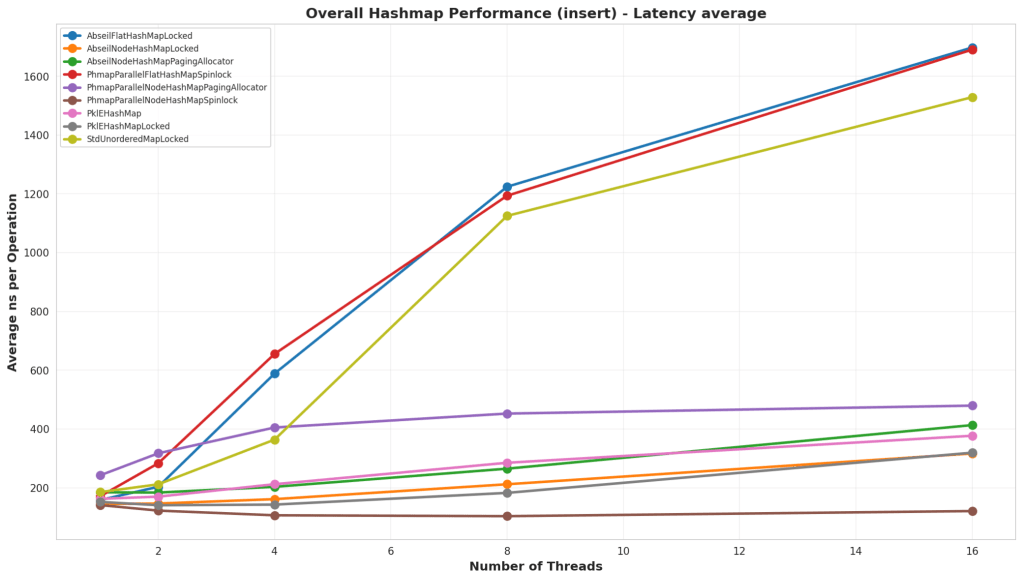
Test Structure

An empty hash map was populated with a large number of elements. Keys were chosen either as sequential numbers, or randomly. In the tests with random numbers, it was structured so that ~20% of the numbers would be collisions with existing values. For all tests, it was tested against both storing a 64 bit integer and a larger struct that contains several primitive types and an std::string.

Analysis

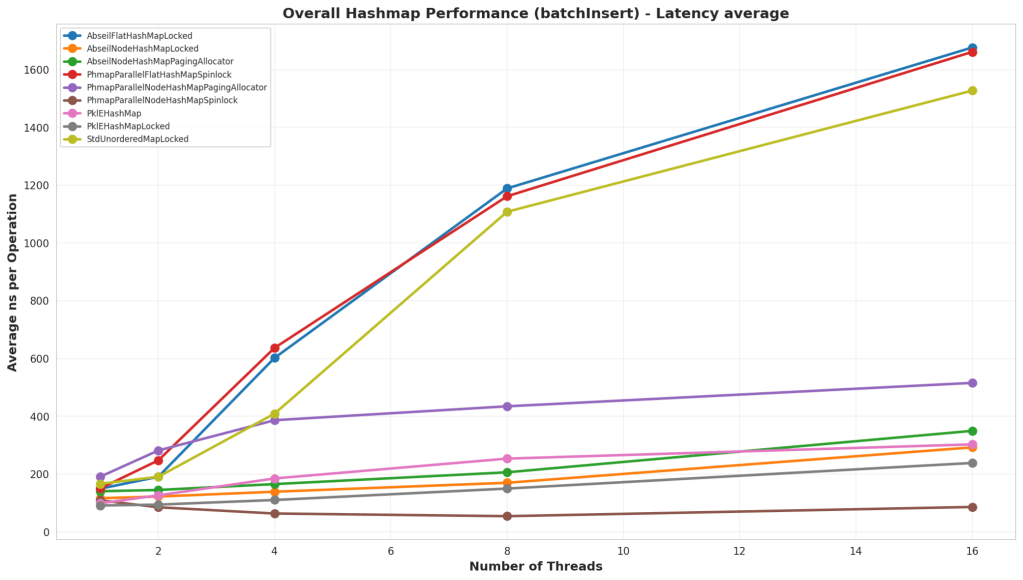
Overall, the default parallel node hash map shone itself to be significantly better than all the others at low and high thread counts. But interestingly enough, PklEHashMapLocked, which is just a basic hash map with an external lock, is on par with Google’s Abseil Hash Map in this test.

Batch Insert
Test Structure

This test starts by reserving space in the map and then inserting entries. Similar to the other Insert test, it uses both sequential and random keys in different tests. The main difference is that memory is reserved ahead of time before inserting, and there is no external locking on parallel hash maps, since this is a supported use case for that data structure.

Analysis

Again, the default parallel node hash map out paced all the other hash maps. Interestingly though, is that the simple PkleHashMap actually beat the Abseil Node Hash Map in this case.

Contended Insert

Test Structure

This test was an insert test on an empty hash map, but in this case 99% of the keys were conflicts. The goal of the test was to test the impact of inserting without doing a find first for certain bad data sets.

Analysis

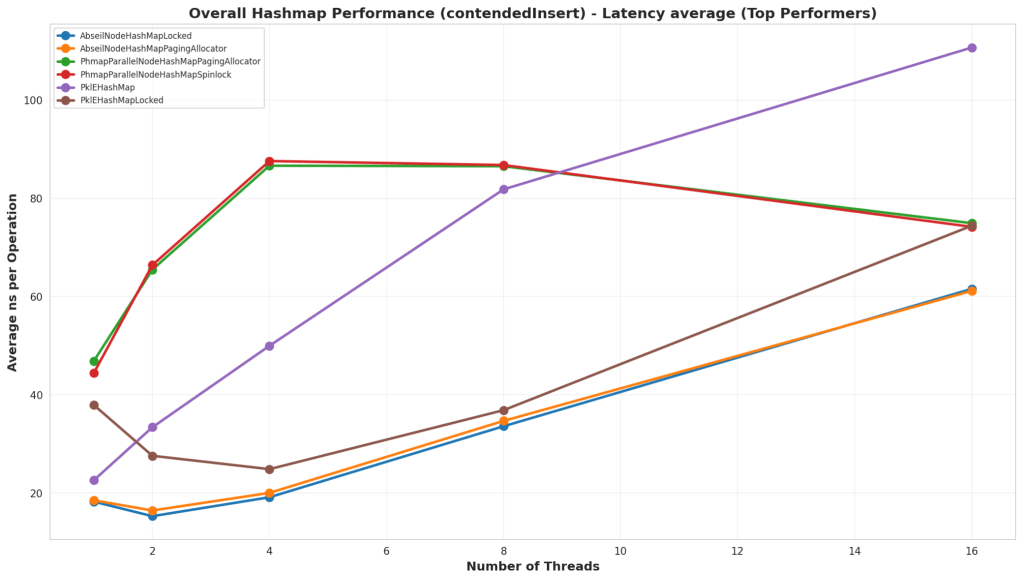
Of note, is that all the hash maps with external storage via the pool ran terribly. That’s because they were still allocating nodes, attempting to insert them, then deallocating them when they failed. So I made a different graph that eliminated those. In the actual results, it looks like the Abseil Hash Map handles collisions better than all the others. Although, it looks like, if the thread counts continued to climb, then Parallel Hash Map would have overtaken it.

Erase
Test Structure

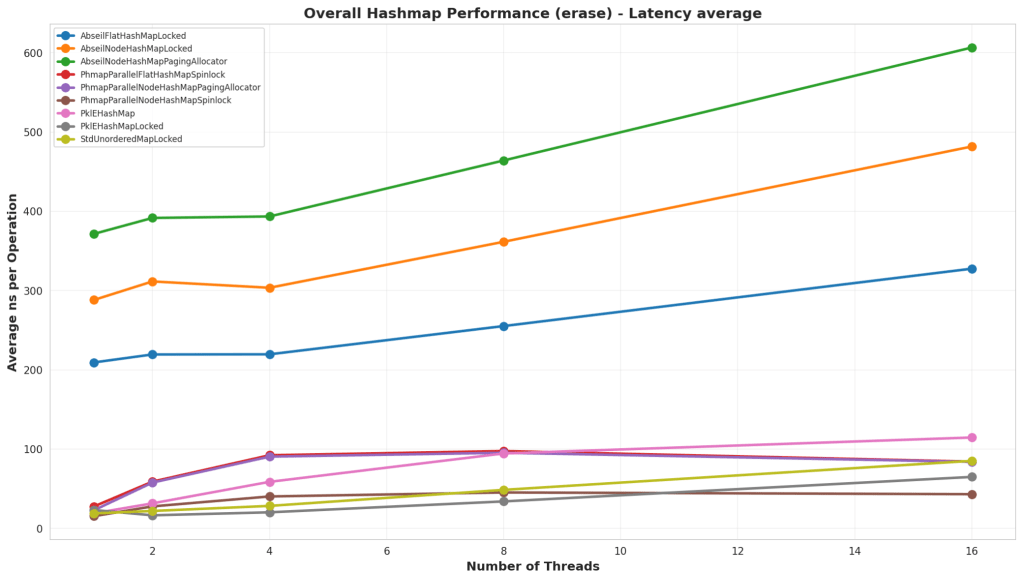
In this test, the hash map was pre-populated with a large number of nodes, and then they were erased sequentially or randomly based on the test.

Analysis

The default Parallel Hash Map continues to be the best performer at high thread counts, but what’s interesting is that at low thread counts, a lock on std::unordered_map or the simple PklEHashMap end up winning out. Although, they’re still fairly comparable until reaching 16 threads.

Lookup
Test Structure

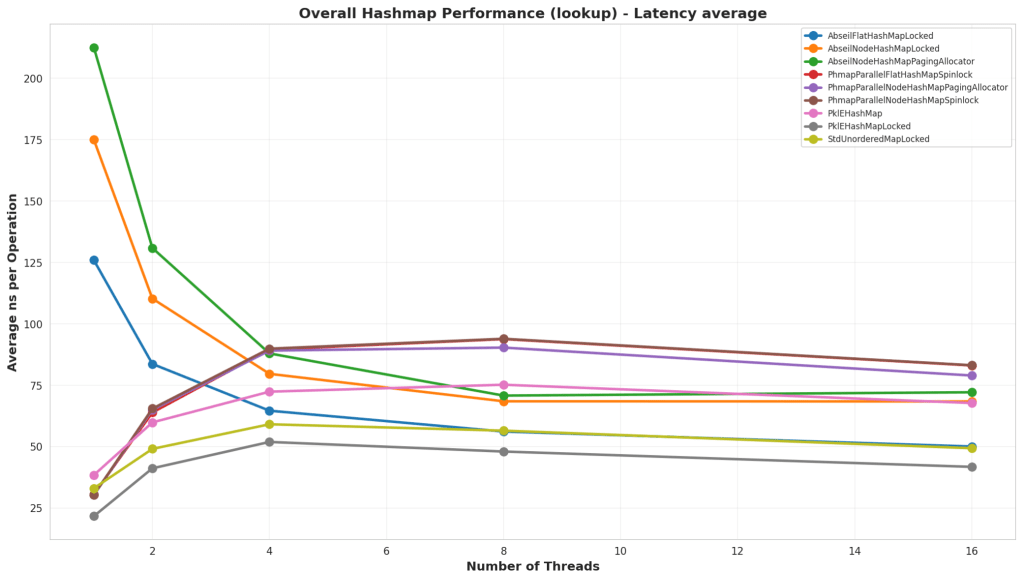
In this test, the hash map was prepopulated either with sequential keys or randomly. Then a lookup was performed both sequentially and randomly on the keys to test the lookup times on the map. The lookups all had a read-only lock though because we’re testing lookup times in the general case scenario where we still would need to be safe from inserts.

Analysis

In this test, the simple PklEHashMap ran faster than all the others. This is likely because it has no real extra meta data to manage internally. It’s basically a fast power-of-two mod then potentially a small linked-list traversal. Parallel Hash Map looks like it lost a lot of performance because of the additional external lock, but also there might be some internal meta data management that ends up taking more time.

Batch Lookup

Test Structure

Similar to the lookup tests, the only difference with these tests is that there’s no locking since it’s entirely read-only operations.

Analysis

In this version, we see std::unordered_map’s main advantages, and that is pure lookup times. But even it isn’t keeping up with PklEHashMap’s lookup times for the lower thread counts, and even at the high thread counts, it’s a toss up on which is actually faster. Of note, is that, while parallel hash map ran faster than in the standard lookup test, it’s still slower than the basic PklEHashMap. Which is fair to expect. It likely has extra meta data and tracking to parse through which impacts lookup times.

90% Reads 10% Writes

Test Structure

In this test, the hash map is partially preloaded with some keys, then we randomly perform reads and writes to the hash map. This case is 90% lookups and 10% inserts.

Analysis

Overall, for low thread counts, it would seem that the simple PklEHashMap is outperforming Parallel Hash Map. It stops performing best at 16 threads, but even then it’s at a comparable number. This case also shows that an std::unordered_map with an external lock performs pretty well if you have a low thread count and are mostly performing read operations.

50% Reads 50% Writes
Test Structure

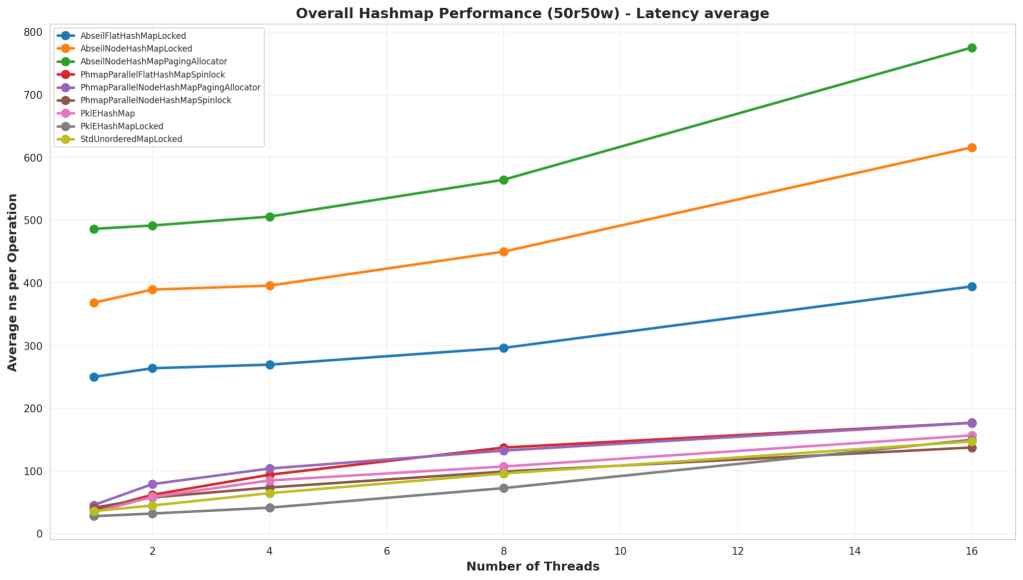
In this test, the hash map is partially preloaded with some keys, then we randomly perform reads and writes to the hash map. This case is 50% lookups and 50% inserts.

Analysis

Similar to the “90% Read 10% Write” test, PklEHashMap actually performed best. Although, once we hit 16 threads, it started to lose out again. It shows that parallel hash map seems to perform best for large thread counts, but it does not win at low thread counts or single threaded situations.

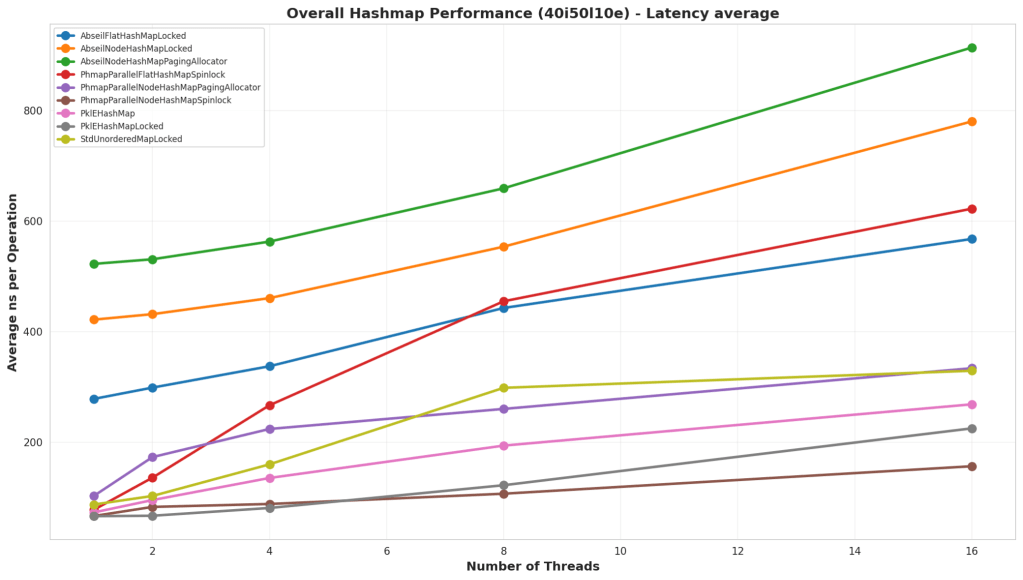
40% Inserts 50% Lookups 10% Erases
Test Structure

In this test, the hash map is partially preloaded with some keys, then we randomly perform reads and writes to the hash map. This case is 50% lookups, 40% inserts, and 10% erases.

Analysis

In this test, Parallel Hash Map is the clear winner. It has ways to safely delete nodes in parallel, and that allows it to run much faster than the other solutions. Although, again, at low thread counts, the simple PklEHashMap runs at a comparable performance.

Rekey
Test Structure

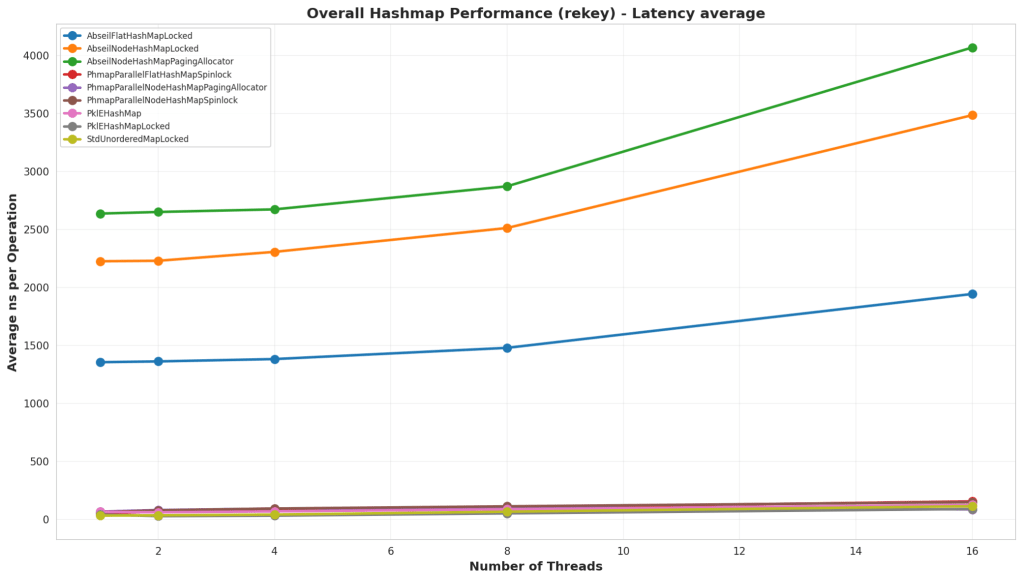
In this test, the map is preloaded with a large number of elements, and then all the elements have their keys changed to another unique key. This kind of operation is helpful for data structures like Spatial Hash Maps where the key might be a location, and the value is the data, and a moving element may change keys a lot.

Analysis

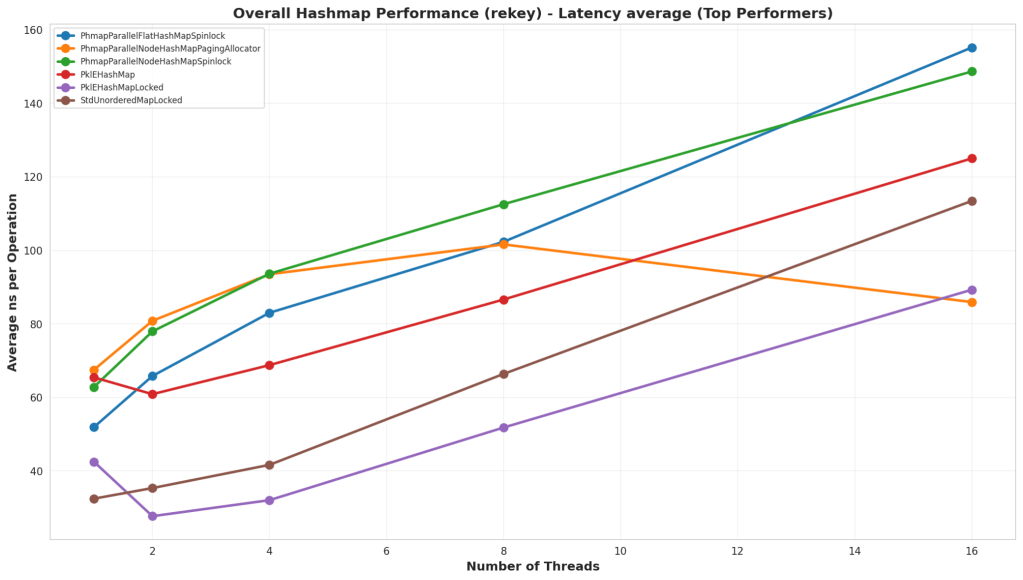
First thing to note is that the Abseil hash maps did not perform well in this test at all. I’m not sure why they did so badly, but it could be that this hits a particularly bad case in how the hash map works. What’s interesting is that PklEHashMap did far better than Parallel Hash Map, and that’s because I actually wrote an internal function for it whereas the Parallel Hash Map has to do a find, erase, and insert. PklEHashMap is simply moving the pointer containing the value from one bucket to another.

Iterator
Test Structure

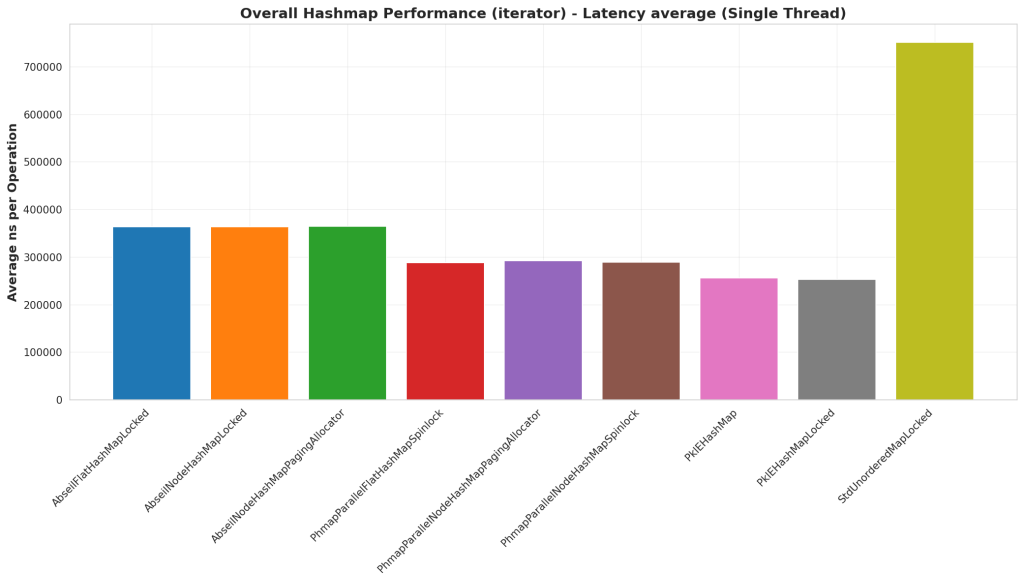
In this test we pre-populate the hash map with a large number of elements, then we use the C++ iterator pattern to iterate over all the elements in the hash map. The iteration passes references to the key and value into a callback to simulate some work being done.

Analysis

In this case, PklEHashMap is faster than all the others. This is likely because PklEHashMap has a pool of elements and the iterator is iterating over the pool instead of the hash map. This approach seems to have produced faster iteration, potentially because there’s slightly better memory locality. That being said, I’m surprised Abseil Hash Map is performing worse than Parallel Hash Map. But Parallel Hash Map must have some optimizations that Abseil does not which lead to better iteration times.

Final Analysis

There were two implementations that seemed to be the top contenders, one was PklEHashMapLocked and PhmapParallelNodeHashMap. But they excelled in different situations, so it boils down a lot to what use case you have. But my overall read of the data is, if you don’t feel a need to worry about memory fragmentation or needing a custom allocator, then use Parallel Hash Map. If you have strict memory 

Use Case Analysis: General Purpose Shared Hash Map

All around, I’d say that the default Parallel Node Hash Map would be the best option if you do not need any kind of custom allocator. But if you need to manage your own allocation in a way to avoid fragmentation or some other use case, then you may be better off writing your own simple hash map like PklEHashMap. The Parallel Node Hash Map generally was either first or second place, and it trended towards better performance with higher thread counts. The simpler PklEHashMap showed high performance in lookups, iteration, and rekeying, but did not scale as well with inserts and deletes.

Use Case Analysis: Global Data Store

Oftentimes, in games especially, you will have a global data store that will need to be accessed by systems at runtime. It’s an immutable store and the lookups are often done via some kind of hash key. In this case, a simple hash map like PklEHashMap is best because it has the best lookup times. Also, in some cases you’ll need to iterate over an entire data table to do runtime processing, and the iteration performance was best in this case as well.

Use Case Analysis: Spatial Hash Map

A Spatial Hash Map is a data structure where entities are stored with a key that is their location and a value of the data for that entity. Since these entities are moving, those keys will regularly need to get modified, but the values will not. In this case, PklEHashMap is ideal since it has fastest rekey times as well as fastest lookup times.

Use Case Analysis: General Purpose Local Hash Map

There’s still many cases where a hash map needs to be used in a purely single threaded environment, and while these benchmarks are not the best thing to reference for that decision. I’d recommend Parallel Hash Map based on this data. It seems to have a lot of optimizations in place that make insert and erase times much faster that simpler solutions like PklEHashMap, which is important many times for transient hash maps like a local hash map on the stack. That being said, I still recommend this benchmark for making a real decision on a general purpose single threaded hash map.

Should you write your own thread safe hash map?

In general, probably not unless you have a specific case to tune against. In my testing, I could create a hash map that was faster than Parallel Hash Map for lookups and rekey operations, but not really by that much. My recommendation is that most people should start by making a wrapper class around an existing open source hash map like Parallel Hash Map, and if they find that they have a bottleneck, then consider a more specialized version for that use case.

Where’s the code

The code is available on GitHub. It’s not packaged in a way where it can just be downloaded and used. But it’s packaged in a way where you could probably point Copilot or Claude or something at it to turn it into useful code. The reason for that is that I did this analysis for a personal project, and making a well-formed, clean library was more work than I wished to embark on.

GitHub Repo is here: https://github.com/PickledMonkey/ParallelHashMapBenchmark
Making a Spin Lock, should you even try?

Why shouldn’t you write your own spin lock implementation

There’s a really good post by Linus Torvalds on why you shouldn’t do it, you can find that here: Link.

But if you don’t really want to read that post, it can be summarized as follows:

  • The OS doesn’t understand there’s a spin lock going on, so a spin lock implementation is going to be working against the OS.
  • If you have more threads than CPU’s then this gets especially bad because the OS could be context switching from one blocked thread to another
  • Yield calls don’t fix this because you can be flooding the OS with scheduling requests
  • Locks are a hard problem that people have spent decades researching, what makes you so clever?
  • Your lock implementation will almost inevitably have downsides to the scheduling of itself and other processes that it would be better to just use the standard locks since they have been worked on by people over decades to solve those downsides.

Why we’re doing it anyway

Because we don’t need a lock that is optimal in all cases. We need a lock that is optimal in our specific case and our application.

We are not working in a general-purpose environment

This blog is about game development, so let’s break down what are things specific to games.

  • The application will run in a single-process with multiple threads
  • The number of threads is limited to the number of cores on the machine (or less)
  • The application is likely to be the only piece of software the user wants to interact with, and may even be the only front-end application running.
  • No tasks on threads are ever long-running. All work needs to be done in a single frame, so an architectural expectation is that any critical sections will have a small footprint.

What concerns do we not care about

Because a game is the user’s focus point. It is a greedy application. I eats up RAM, VRAM, CPU time, GPU time, Disk Space, Everything. It is a special application that users are okay with eating up all the OS’s scheduling time because it’s the thing they’re focused on. All this means that we are allowed to write a lock that messes up the OS’s scheduling, so long as it’s in the name of improving our application’s best interests. Video games are not good neighbors to other processes. We don’t really need the OS to understand we’re locked and it could theoretically schedule another process because we want it to think we’re the top dog process.

We also don’t care about performance for long-running threads with large critical sections. This is not a common thing for games to have, and if you’re going to need those, then I definitely don’t recommend a spin-lock. I’d recommend an event-based architecture that relies on things like std::condition_variable.

What concerns do we care about

We need to make sure our lock has the best throughput for our application. So we need to make sure it has the lowest latency to acquire and release the lock. It also needs to actually work. We want to make sure that, for very small critical sections, we can avoid expensive context switches. Basically we just want high-throughput and avoiding expensive OS calls if possible.

What’s a typical spin-lock implementation

Using std::atomic

Here’s an article to what I think has been the most standard spin-lock implementation I’ve seen Link. What it boils down to is the use of an std::atomic variable and the use of exchange() or compare_exchange(). This is a very reasonable approach and is the standard for writing a lock. It’s using the standard library so it’s portable, and it’s going to work. If it doesn’t work, then the compiler probably has a bug.

Using std::mutex

But why write a lock using the standard libraries if they already have multiple lock implementations like std::scoped_lock, std::unique_lock, and std::shared_lock. Those are very robust lock implementations, portable, feature rich, and they’re standard. This seems even more reasonable than implementing something with std::atomic. It would only seem like a good idea if writing our own lock was faster. And this is indeed the question. Can we write a lock faster than these std locks for our use-case? That’s the important point, we are only benchmarking our own use-case. Not all possible use cases.

Using atomic increments, decrements, adds, and subtracts

There’s an article Here where a spinlock was implemented with std::atomic but used fetch_add(), fetch_or(), and fetch_sub() to implement a lock. It’s an interesting article, and ultimately the thing that stands out is that the performance of the std::atomic fetch_sub() was significantly faster than compare_exchange(). But I wasn’t quite satisfied with the result of the benchmark performed. It just didn’t make sense to me that fetch_add performed so differently than fetch_sub because theoretically, the underlying instructions shouldn’t be that much different. So, my thought was to build a spin lock around atomic increments, decrements, adds and subtracts myself and see what we’re looking at.

The spin lock we’re going to benchmark

Atomics will be managed with their underlying instructions

This might be controversial to some folks, but I’ve never liked std::atomic. It has its advantages, but honestly, I just prefer some good old fashion helper functions to the actual atomic instructions. I think std::atomic is a good interface for creating portable threadsafe variables, but I also think it’s fairly complex to use and I don’t really know what it’s doing behind-the-scenes. And when we’re talking about optimizing a spin lock, we kinda need to know what is going on.

So here is the interface I’m using for our atomic instructions:

uint32_t AtomicIncrementU32(uint32_t& value)
{
    return __atomic_add_fetch(&value, 1, __ATOMIC_RELAXED);
}
uint32_t AtomicDecrementU32(uint32_t& value)
{
    return __atomic_sub_fetch(&value, 1, __ATOMIC_RELAXED);
}
uint32_t AtomicAddU32(uint32_t& value, uint32_t addend)
{
    return __atomic_add_fetch(&value, addend, __ATOMIC_RELAXED);
}
uint32_t AtomicSubtractU32(uint32_t& value, uint32_t subtrahend)
{
   return __atomic_sub_fetch(&value, subtrahend, __ATOMIC_RELAXED);
}
uint32_t AtomicAndU32(uint32_t& value, uint32_t mask)
{
    return __atomic_fetch_and(&value, mask, __ATOMIC_RELAXED);
}
uint32_t AtomicOrU32(uint32_t& value, uint32_t mask)
{
    return __atomic_fetch_or(&value, mask, __ATOMIC_RELAXED);
}

You’ll notice that there’s one thing different about these calls is that we’re using add_fetch and sub_fetch instead of fetch_add and fetch_sub like std::atomic tends to use.

Lock Implementations

There are 3 separate implementations being looked at:

  1. CountingSpinLock – Prioritizes readers over writers. So the writers must wait for all readers to finish before they can secure the lock. If a reader attempts to join while a writer is working, then they must wait for that writer to finish, but they have a reservation which blocks any other writers from continuing afterwards.
  2. WritePriorityCountingSpinLock – Prioritizes writers over readers. So the readers do not make reservations while the writer is running, but the first writer will make a reservation that blocks other new readers from starting until the writer is finished.
  3. MultiReaderWriterCountingSpinLock – A version that allows multiple readers or multiple writers. It’s a weird lock that probably wouldn’t be used in many scenarios, but the idea is that there are some situations where a bunch of writers can be allowed to operate so long as there are no readers, and vice-versa. Read locks are prioritized in this implementation.

One thing you’ve probably noticed is that none of these locks are fair. Either writers are prioritized or readers are. Making the lock fair wouldn’t be too difficult, but doing so would increase the amount of write-calls necessary for the lock to work. The trade-off is that there’s the potential for starvation, but in the context of this article (on games), this realistically wouldn’t happen because all the work to do happens within a frame. The application architecture does not allow long-running tasks or large critical sections. If that’s your situation, then don’t use spin locks, it’s a bad place for them.

Lock Implementation #1 : CountingSpinLock

void CountingSpinlock::AcquireReadOnlyAccess()
{
    uint32_t numRetriesLeft = 0xFFFFFFFF;

    do
    {
        uint32_t nextVal = Util::AtomicIncrementU32(lockValue);
        if ((nextVal & c_multiReaderWriter_WriteMask) == 0)
        {
            //No write lock is held, so we can proceed
            break;
        }
        else
        {
            //A write lock is held, so we need to wait for it to be released
            while ((lockValue & c_multiReaderWriter_WriteMask) != 0)
            {
                //Spin until the write lock is released
                std::this_thread::yield();
            }
            break; //We got it, so break out.
        }
        --numRetriesLeft;
    } while (numRetriesLeft > 0);
}
void CountingSpinlock::ReleaseReadOnlyAccess()
{
    Util::AtomicDecrementU32(lockValue);
}

void CountingSpinlock::AcquireReadAndWriteAccess()
{
    uint32_t numRetriesLeft = 0xFFFFFFFF;

    do 
    {
        uint32_t nextVal = Util::AtomicAddU32(lockValue, c_multiReaderWriter_WriteIncrement);
        if (nextVal == c_multiReaderWriter_WriteIncrement)
        {
            // No read or write locks are held, so we can proceed
            break;
        }
        else 
        {
            // Undo the write-lock increment
            Util::AtomicSubtractU32(lockValue, c_multiReaderWriter_WriteIncrement);

            // A read or write lock is held, so we need to wait for them to be released
            while (lockValue != 0)
            {
                // Spin until the read and write locks are released
                std::this_thread::yield();
            }

            // Try grabbing it again since there aren't any read or write locks held now
        }
        --numRetriesLeft;
    } while (numRetriesLeft > 0);
}

void CountingSpinlock::ReleaseReadAndWriteAccess()
{
    Util::AtomicSubtractU32(lockValue, c_multiReaderWriter_WriteIncrement);
}

Lock Implementation #2 : WritePriorityCountingSpinLock

void CountingSpinlock::AcquireWritePriorityReadOnlyAccess()
{
    uint32_t numRetriesLeft = 0xFFFFFFFF;

    do
    {
        uint32_t nextVal = Util::AtomicIncrementU32(lockValue);
        if ((nextVal & c_writeLockBit) == 0)
        {
            //No write lock is held, so we can proceed
            break;
        }
        else
        {
            //Undo the read-lock increment
            Util::AtomicDecrementU32(lockValue);

            //A write lock is held, so we need to wait for it to be released
            while ((lockValue & c_writeLockBit) != 0)
            {
                //Spin until the write lock is released
                std::this_thread::yield();
            }
        }
        --numRetriesLeft;
    } while (numRetriesLeft > 0);
}
void CountingSpinlock::ReleaseWritePriorityReadOnlyAccess()
{
    Util::AtomicDecrementU32(lockValue);
}

void CountingSpinlock::AcquireWritePriorityReadAndWriteAccess()
{
    uint32_t numRetriesLeft = 0xFFFFFFFF;

    do 
    {
        uint32_t prevVal = Util::AtomicOrU32(lockValue, c_writeLockBit);
        if (prevVal == 0)
        {
            //No read or write locks are held, so we can proceed
            break;
        }
        else if ((prevVal & c_writeLockBit) == 0)
        {
            //No write lock is held, but there are read locks held, so we need to wait for them to be released
            while (lockValue != c_writeLockBit)
            {
                //Spin until the read locks are released
                std::this_thread::yield();
            }

            //All read locks have been released, so we can proceed
            break;
        }
        else if ((prevVal & c_writeLockBit) != 0)
        {
            //A write lock is held, so we need to wait for it to be released
            while ((lockValue & c_writeLockBit) != 0)
            {
                //Spin until the write lock is released
                std::this_thread::yield();
            }
        }
        --numRetriesLeft;
    } while (numRetriesLeft > 0);
}

void CountingSpinlock::ReleaseWritePriorityReadAndWriteAccess()
{
    Util::AtomicAndU32(lockValue, ~c_writeLockBit);
}

Lock Implementation #3 : MultiReaderWriterCountingSpinLock

void CountingSpinlock::AcquireMultiReaderWriterReadAccess()
{
    uint32_t numRetriesLeft = 0xFFFFFFFF;

    do
    {
        uint32_t nextVal = Util::AtomicIncrementU32(lockValue);
        if ((nextVal & c_multiReaderWriter_WriteMask) == 0)
        {
            //No write locks are held, so we can proceed
            break;
        }
        else
        {
            //A write lock is held, so we need to wait for it to be released
            while ((lockValue & c_multiReaderWriter_WriteMask) != 0)
            {
                //Spin until the write lock is released
                std::this_thread::yield();
            }

            break; //No write locks are held, so we can proceed
        }
        --numRetriesLeft;
    } while (numRetriesLeft > 0);
}

void CountingSpinlock::ReleaseMultiReaderWriterReadAccess()
{
    Util::AtomicDecrementU32(lockValue);
}

void CountingSpinlock::AcquireMultiReaderWriterWriteAccess()
{
    uint32_t numRetriesLeft = 0xFFFFFFFF;

    do
    {
        uint32_t nextVal = Util::AtomicAddU32(lockValue, c_multiReaderWriter_WriteIncrement);
        if ((nextVal & c_multiReaderWriter_ReadMask) == 0)
        {
            //No read locks are held, so we can proceed
            break;
        }
        else
        {
            //Undo the write-lock increment
            Util::AtomicSubtractU32(lockValue, c_multiReaderWriter_WriteIncrement);

            //A read lock is held, so we need to wait for it to be released
            while ((lockValue & c_multiReaderWriter_ReadMask) != 0)
            {
                //Spin until the read lock is released
                std::this_thread::yield();
            }
        }
        --numRetriesLeft;
    } while (numRetriesLeft > 0);
}

void CountingSpinlock::ReleaseMultiReaderWriterWriteAccess()
{
    Util::AtomicSubtractU32(lockValue, c_multiReaderWriter_WriteIncrement);
}

Benchmarking Code

For all the benchmarks, I’m using scoped versions of locks since it’s more common in practice than calling Lock/Unlock calls. I’m using GTest as the interface for running all the benchmarking code.

Test Code Structure

The tests themselves all are structured something like the following:

TEST_F(SpinLockWriteHeavyTest, StdMutex_AllWrites_MultiThread)
{
    std::mutex mtx;
    uint64_t counter = 0;

    auto writeOperation = [&mtx, &counter](uint32_t) {
        std::scoped_lock lock(mtx);
        SpinLockBenchmarkTest::SimulateWork();
        ++counter;
    };

    RunWithThreadCount<16>("StdMutex_AllWrites_MultiThread", writeOperation, OPERATIONS_PER_THREAD);
    ASSERT_EQ(counter, OPERATIONS_PER_THREAD);
    counter = 0;

    RunWithThreadCount<8>("StdMutex_AllWrites_MultiThread", writeOperation, OPERATIONS_PER_THREAD);
    ASSERT_EQ(counter, OPERATIONS_PER_THREAD);
    counter = 0;

    RunWithThreadCount<4>("StdMutex_AllWrites_MultiThread", writeOperation, OPERATIONS_PER_THREAD);
    ASSERT_EQ(counter, OPERATIONS_PER_THREAD);
    counter = 0;

    RunWithThreadCount<2>("StdMutex_AllWrites_MultiThread", writeOperation, OPERATIONS_PER_THREAD);
    ASSERT_EQ(counter, OPERATIONS_PER_THREAD);
    counter = 0;

    RunWithThreadCount<1>("StdMutex_AllWrites_MultiThread", writeOperation, OPERATIONS_PER_THREAD);
    ASSERT_EQ(counter, OPERATIONS_PER_THREAD);
}

Simulating a workload

The SimulateWork function looks like this:

static void SimulateWork()
{
    volatile uint64_t dummy = 0;
    for (uint32_t i = 0; i < WORK_CYCLES; ++i)
    {
        dummy = dummy + i;
    }
}

Running on Multiple Threads

The RunWithThreadCount function looks like this:

template<uint32_t NUM_THREADS>
static void RunWithThreadCount(const char* testName, auto&& testLogic, uint64_t expectedCount)
{
    using ThreadPoolType = PklE::MultiThreader::WorkerThreadPool<1, NUM_THREADS, 1, 500, 64>;
    ThreadPoolType pool;
    typename ThreadPoolType::ThreadDistribution distribution;
    distribution[0] = 16;
    typename ThreadPoolType::ThreadDistribution balanced = pool.DistributeThreads(distribution);
    pool.StartThreads(balanced);

    auto start = std::chrono::high_resolution_clock::now();

    const uint32_t c_maxTasks = 64;
    const uint32_t c_elementsPerTask = 25;
    const bool bCallingExternally = true;

    pool.template RunParallelForInRangeInQueue<c_maxTasks>(0, OPERATIONS_PER_THREAD, 0, testLogic, c_elementsPerTask, bCallingExternally);

    auto end = std::chrono::high_resolution_clock::now();
    auto duration = std::chrono::duration_cast<std::chrono::nanoseconds>(end - start);

    char fullTestName[256];
    snprintf(fullTestName, sizeof(fullTestName), "%s_%dThreads", testName, NUM_THREADS);
    auto result = CreateResult(fullTestName, duration, expectedCount);
    result.Print();
}

You’ll see some stuff in there about a custom thread-pooling implementation. You can choose to believe me on whether or not you think that works, but it’s something else I set up that I might write an article about later.

Benchmarking Results

Tests

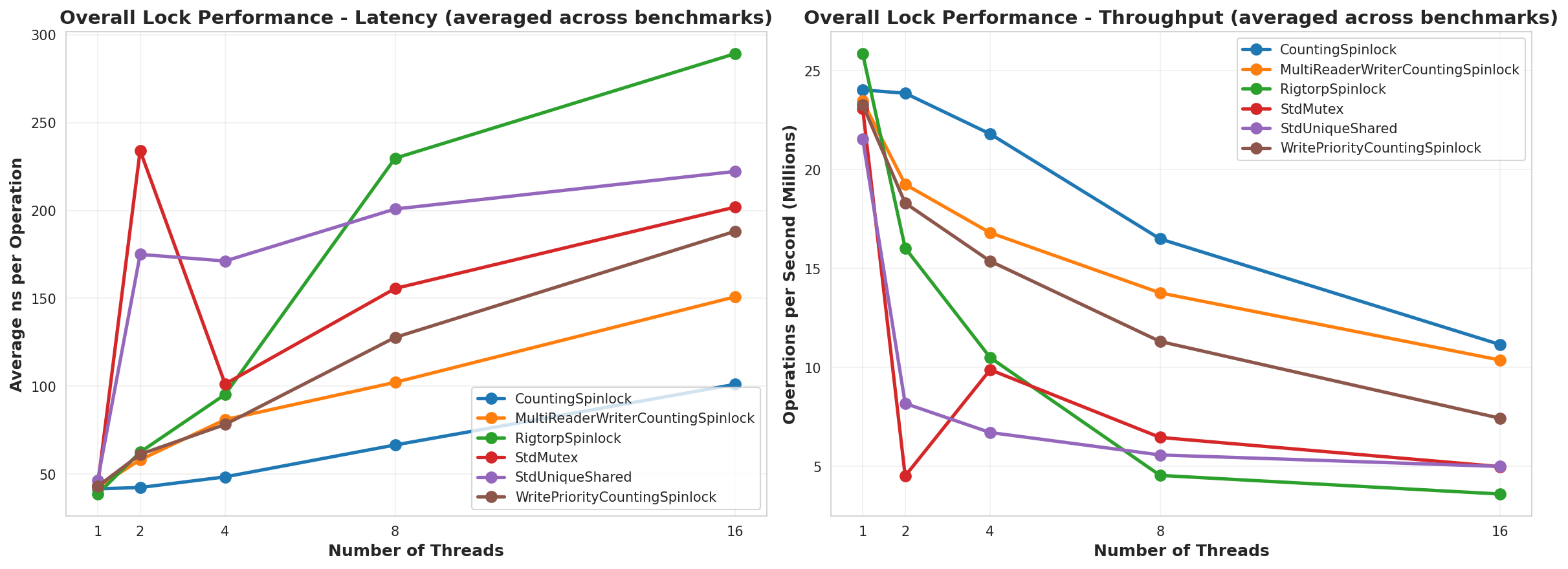
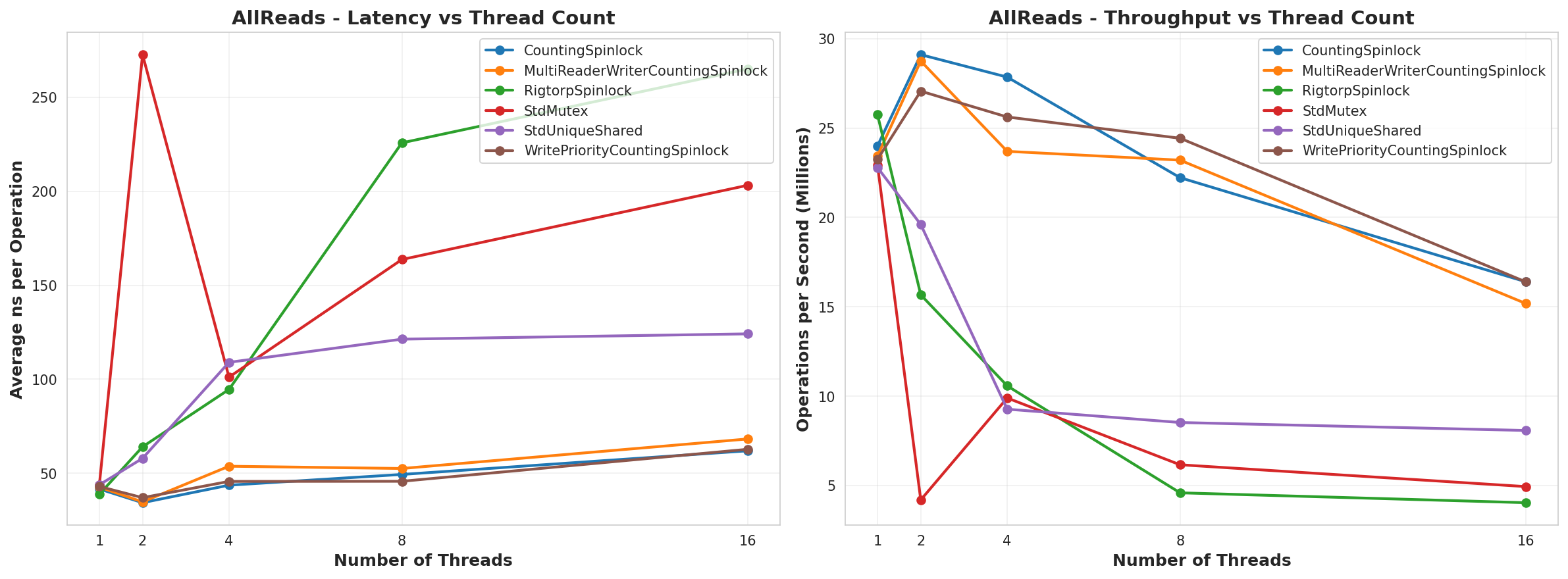
There were 5 tests run for each lock type. For each test they were tested on a scaled number of threads from 1 to 16 incrementing in powers of 2. These were all run on a 16 core machine hosted through GitHub Codespaces. For each test, I ran it 5 times and averaged the results to try and reduce any kind of random errors introduced by individual runs.

The tests are as follows:

  • AllReads – The locks were only used in a read-only way
  • AllWrites – The locks were only used to lock a writable critical section
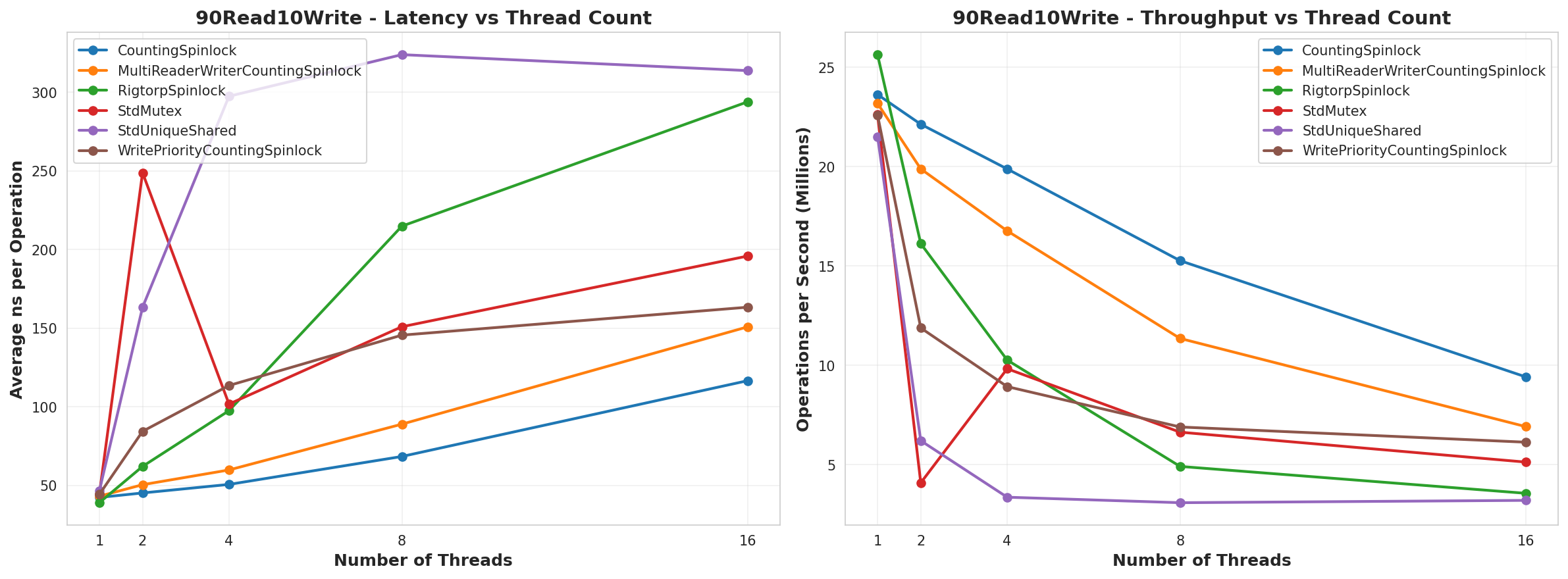
  • 90Read10Write – 90% of the locking operations were read-only
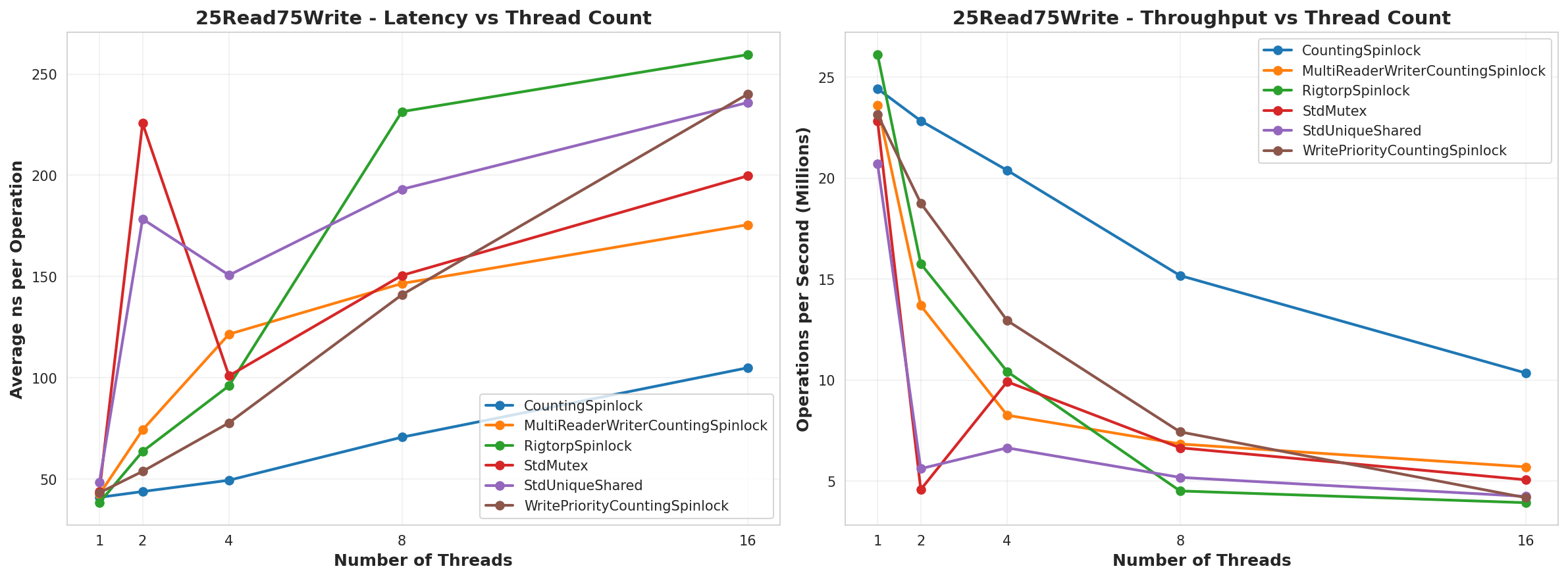
  • 50Read50Write – Half the locking operations were read-only
  • 25Read75Write – 25% of the locking operations were read-only

The locks benchmarked are as follows:

  • StdMutex – a standard std::mutex locked used std::scoped_lock
  • StdUniqueShared – a std::shared_mutex locked using std::shared_lock and std::unique_lock depending on read/write access
  • Rigtorp – the custom spin lock implementation from here.
  • CountingSpinLock – Described above in the lock implementation #1 section
  • WritePriorityCountingSpinLock – Described above in the lock implementation #2 section
  • MultiReaderWriterCountingSpinLock – Described above in the lock implementation #3 section

Result Graphs

All Reads

All Writes

90% Reads, 10% Writes

50% Reads, 50% Writes

25% Reads, 75% Writes

Overall Average

Summary

So, from this test, it looks like the CountingSpinLock ran better than everything. The only place where it didn’t appeared to be when it was All Writes and then the MultiReaderWriter won over, which makes sense since it’d be the only lock that was actually running in parallel. I would have expected it to also run faster than the CountingSpinLock in the 25Read75Write test, but my guess is that, since it’s a reader prioritized lock, it never got the lock as often as it needed. The other piece of this is that the MultiReaderWriter had to run. Of note as well, is that in the AllWrites test, the WritePriority lock vs the regular CountingSpinLock used an atomic OR and AND operation instead of incrementing and decrementing. That is probably why it has such lower performance. I think I’d replace that to use an add and subtract like the others to have better performance.

Why does CountingSpinLock do so well in this benchmark compared to the others?

I think there’s a few reasons for this. 

One reason would be that the standard locks are trying to be true general purpose locks that are guaranteed to work across all platforms. They seek best performance across a wide variety of benchmarks. They will attempt to work with the operating system to be fair for all processes and threads. And for all they need to do, they are performing really really well. Again, I would use those lock implementations for any long-running tasks or large critical sections. But they are sub-optimal for a single process, thread counts close to the CPU count, and small critical sections.

Another reason is that CountingSpinLock is using a relaxed memory ordering while implementations involving compare-exchange need to specify stricter memory ordering because that order matters. This matters because it affects how the processor will optimize the cache. Because we’re using adds and subtracts, the order of the instructions doesn’t matter, so long as the result we get is the correct result at that moment, and that’s guaranteed (only the order of the instructions is not). Once we have that result, we’ll be accessing that cached version until another atomic operation clears that cache value. This means the spin-wait is cheap since it won’t mark the cache dirty, and the processor and compiler can optimize the cache use as much as possible.

When would I expect CountingSpinLock to perform like garbage

I expect it to work terribly for any long-running critical section. I expect it to work terribly if you have way more threads than CPUs. It also is not a nested lock, so if a thread takes the lock, then invokes another function that also attempts to take the lock, you can get a deadlock. This is meant to be a high-performance way to manage small critical sections.

Where is the code?

It’s on GitHub here:

https://github.com/PickledMonkey/CountingSpinLockBenchmark

Of note is that the code is not packaged to compile or anything. It’s mostly just snippets I pulled so that it can be pulled into whatever development environment you’re working in. In this age of AI coding, you could probably ask an AI to pull the repo and integrate the code if you wanted.

References used when making this article

Links:
https://mmomtchev.medium.com/spinlock-vs-mutex-performance-3f73de53a460

https://www.realworldtech.com/forum/?threadid=189711&curpostid=189723

https://rigtorp.se/spinlock/

https://dev.to/agutikov/who-is-faster-compareexchange-or-fetchadd-1pjc

Making a Dynamic AI for a VR Game

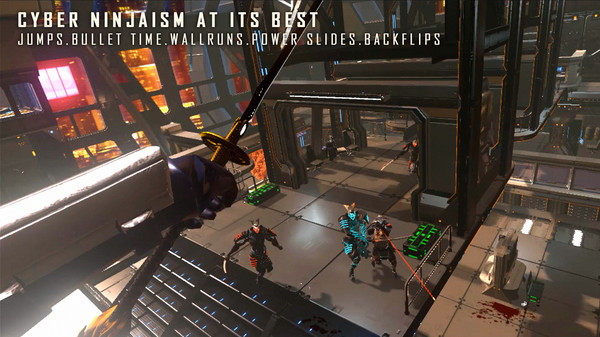
I was recently playing a neat VR game called Sairento VR. It’s a cool game where you play a kick-butt cyber-ninja-lady, but there was one thing that was a bit off-putting for me. The enemies all executed the same canned animations whenever they attacked you. For shooting a gun, that’s fine, but it was really awkward in melee encounters. Even though you knew they were just repeating the same animation, it was hard to react to. I think the problem is because they never adjusted the animation to react based on how you, the player was positioned. So, I thought to myself, how can you make an adversary in VR that seems to react based on how the player is poised? Then I put together a little experiment.

Image courtesy of Steam store page. It’s a cool game, you can buy it here: https://store.steampowered.com/app/555880/Sairento_VR/

Setting up the Test Environment

The first step was to make a test bed for experimenting with an AI. So I put together a simple game.

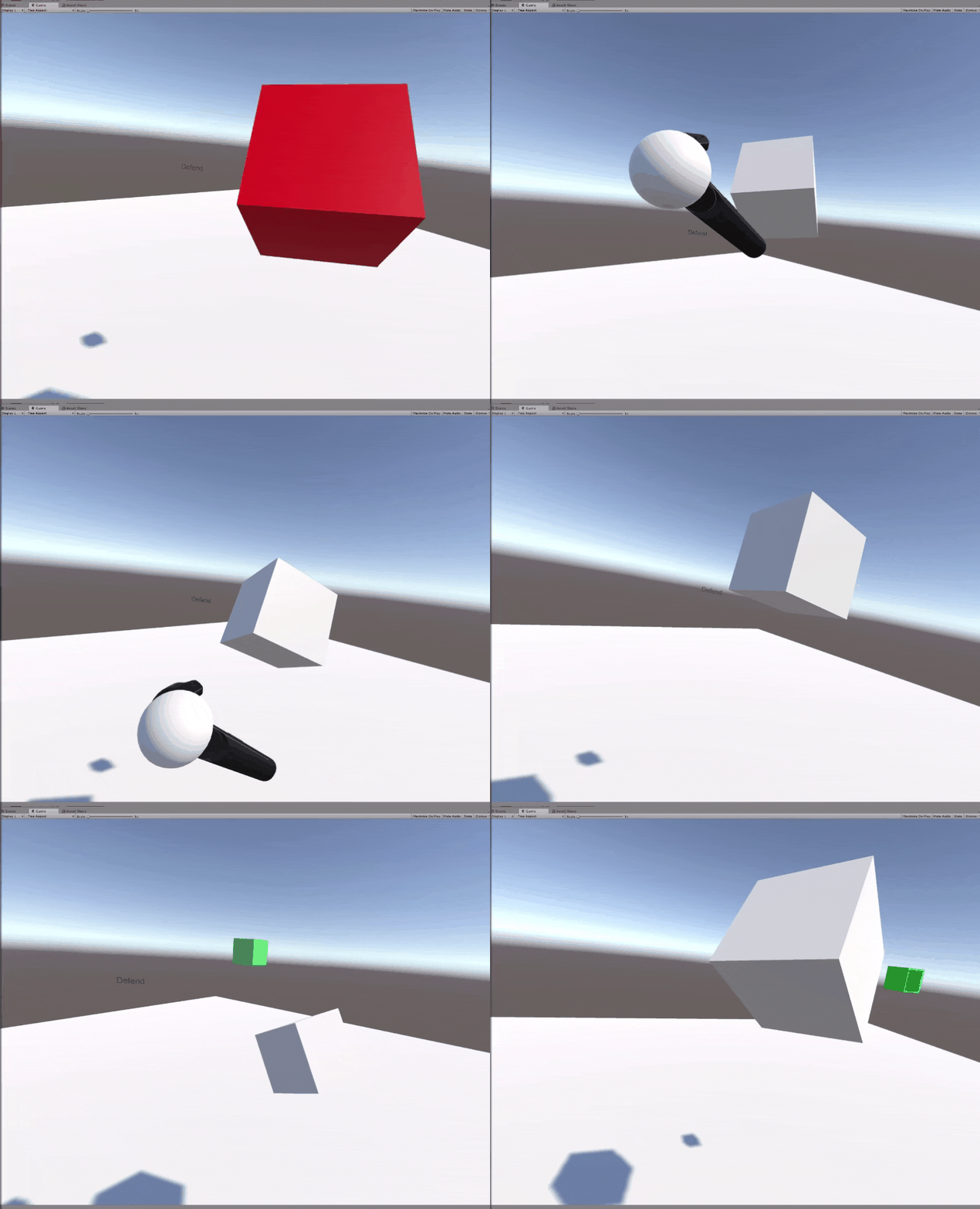
Player must hit target with hand; AI paddle must block player

The player just has to touch a small floating block in the center of the room; everytime you do, you get a point. However, there is a floating “Paddle” controlled by an AI. If the AI paddle touches your hand, you were “blocked” and the AI gets a point. The goal of the AI is to minimize the points the player earns while maximizing the points it earns. However, the AI’s challenge is that it only has 3 potential movement options, Attacking, Defending, and Stopping.

AI Movement Attacking

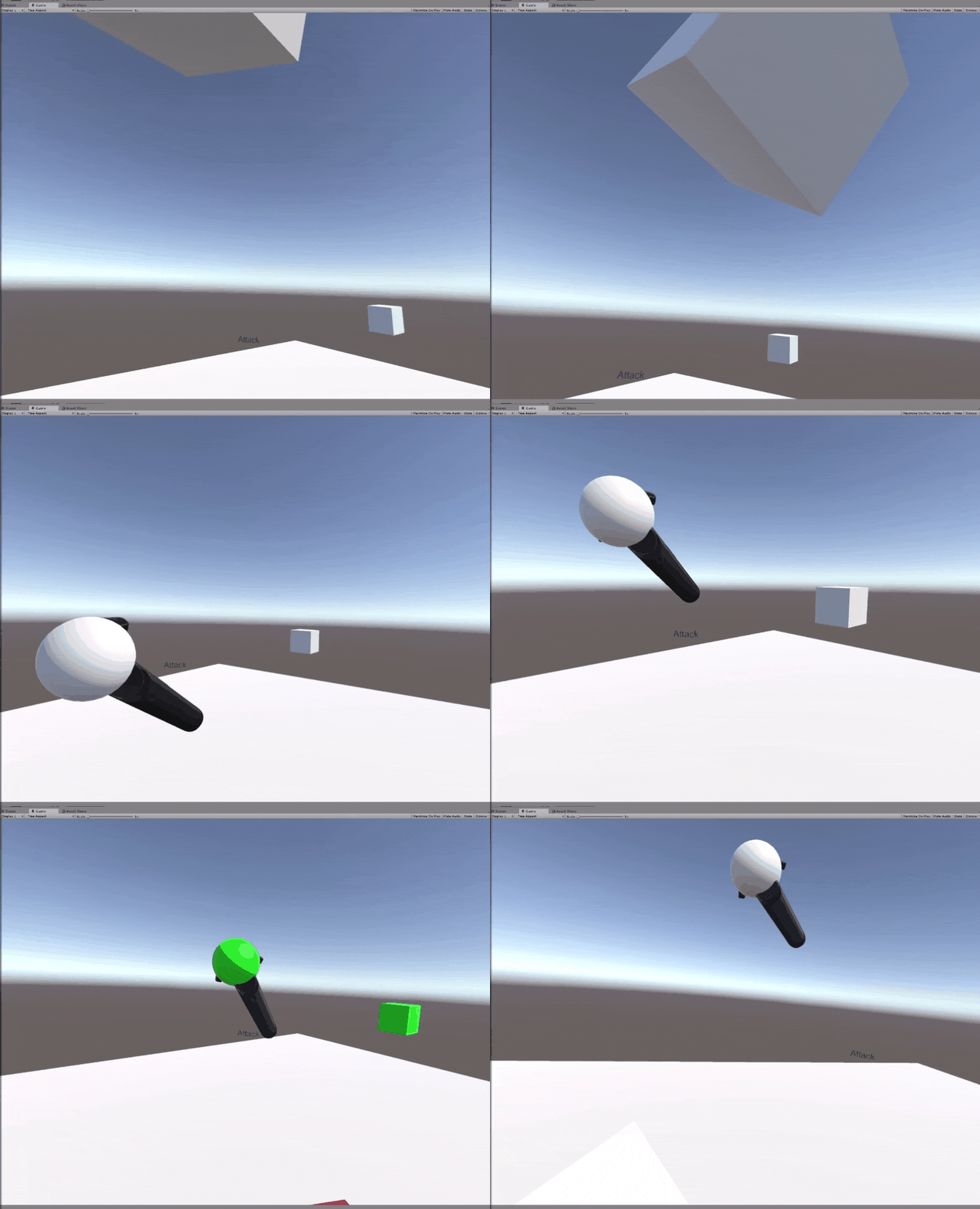
The Attacking movement is simple. The Paddle will simply charge toward the player’s hand as fast as it can. The problem with this approach is that the player can just dodge the attack and the AI will take a long time turning around to re-engage.

Attacking behavior in action

AI Movement Defending

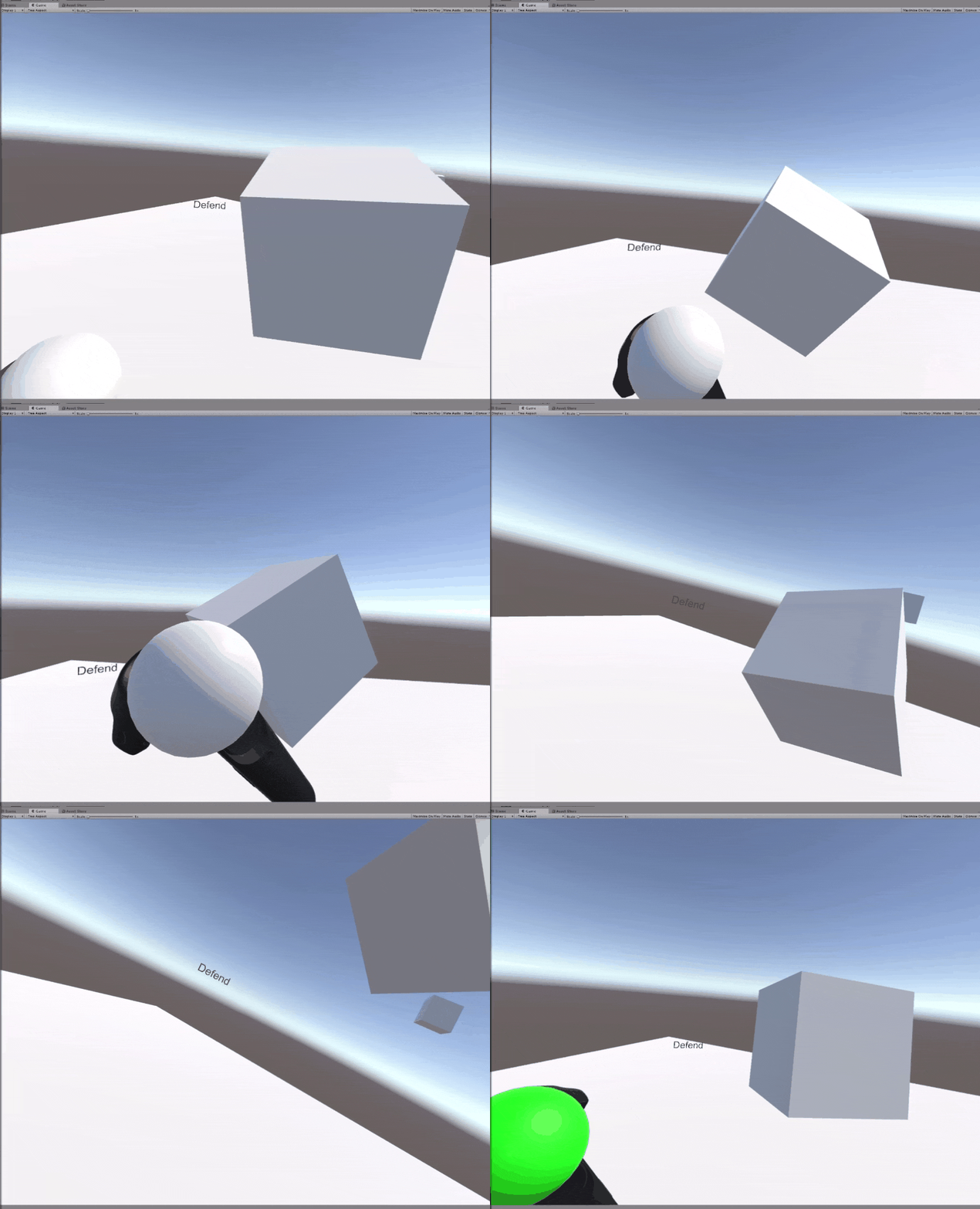
The Defending movement is also pretty simple. The AI will simply try to sit between the player and the target. The downside is that it can’t move as fast as Attacking.

Defending behavior in action

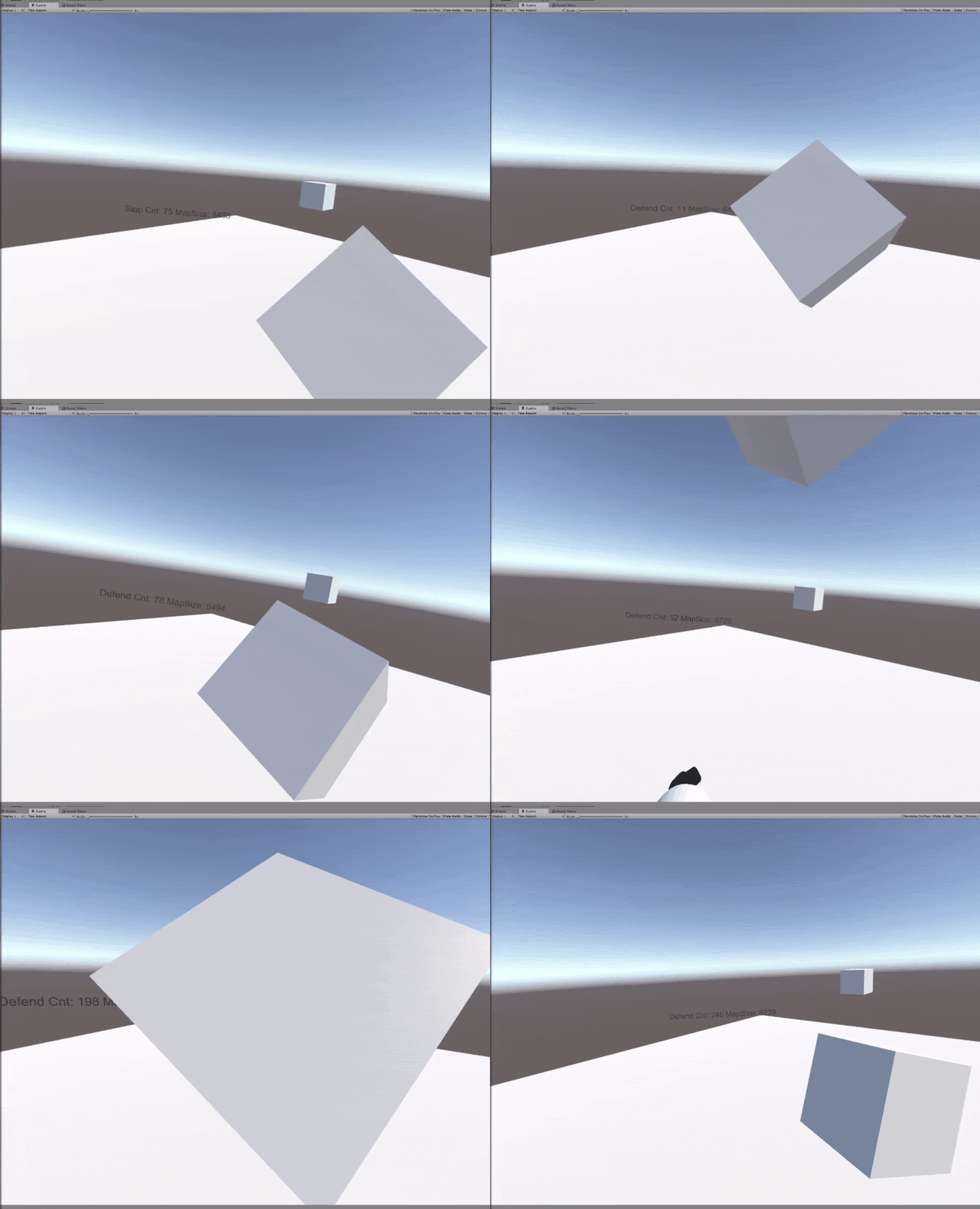
Stop Movement

The stop movement is meant to compliment the other two behaviors. To help the AI deal with getting launched far away, it can stop itself at anytime to change direction.

Attacking behavior paired with the Stop behavior

When the Stop movement is combined with attacking, the AI becomes extremely aggressive, and the player needs to keep moving to avoid getting hit. However, it’s still really predictable and as long as you’re moving you’re not going to get hit.

Defending behavior paired with Stop behavior

When the Stop movement is combined with defending, it helps the AI keep up with the player, but it’s still not enough. The player can still move faster than the AI, and it can be tricked to move off to the side to allow the player access to the target. For the AI to really be effective, it needs to still go on the offensive when it has an opening.

Putting It Together for a Basic AI State Machine

Obviously, each of these actions won’t pose much of a challenge for the player by themselves, so the next course of action is to just put it all together in a simple state machine to see how it acted.

Combining all behaviors in a simple state machine

The state machine is based off the AI’s Time to Collision (ttc) with the Player’s hand and the AI’s distance from the Player’s hand. If the ttc is negative, then that implies the Paddle is moving away from the player’s hand, so it stops. Otherwise it will defend until the player’s hand is close enough to attempt an attack.

Simple state machine behavior

This behavior is a lot more interesting than the previous examples. However, it still has the same problem of being very predictable. Once the player figures out the sweet spot to avoid getting hit, they can do the same action every time. What needs to happen, is the AI needs to learn certain patterns the player tends to follow.

Adding Weights to State Transitions

The next idea is what if there’s some way to supersede the default logic when the player might be trying to trick it. That would allow the AI to react in a trickier way, and the player might find it more engaging.

Adding weights to the state machine AI

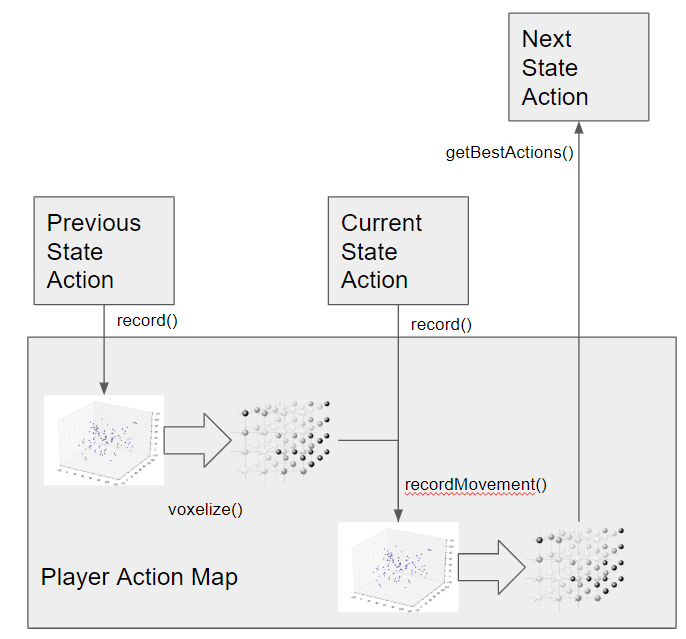
However, adapting to the player’s behavior implies some sort of way to record what’s been happening and what the outcome was. To start, I broke down the game into a state structure to describe what’s going on at a single moment. I chose the state to be a combination of the location and velocity of the player’s hand and the paddle. This makes a state space that contains plenty of information at each state, but has the downside of being too granular to be useful. To solve that problem, I just rounded the values for each state into a set a state “voxels” and used a KD-Tree for storing the state history.

Voxelizing State Information for Recording

The purpose of storing a state history is that we can also store what action was chosen by the AI at that particular state and adjust a weight on that particular action based on whether it led to the AI or player scoring a point.

Weighted state machine AI

In practice this actually kinda worked okay. The AI responded differently as the player got more points, and it made for a much more challenging game. In this particular example it was interesting because as the game went on, the AI just became more aggressive and would attack more often when you tried to trick it. The AI also isn’t acting with any kind of high level plan or really any anticipation of what the player will do next; it’s simply trying something different because the last time led to failure. So, the next step is to give it some kind of higher level decision making.

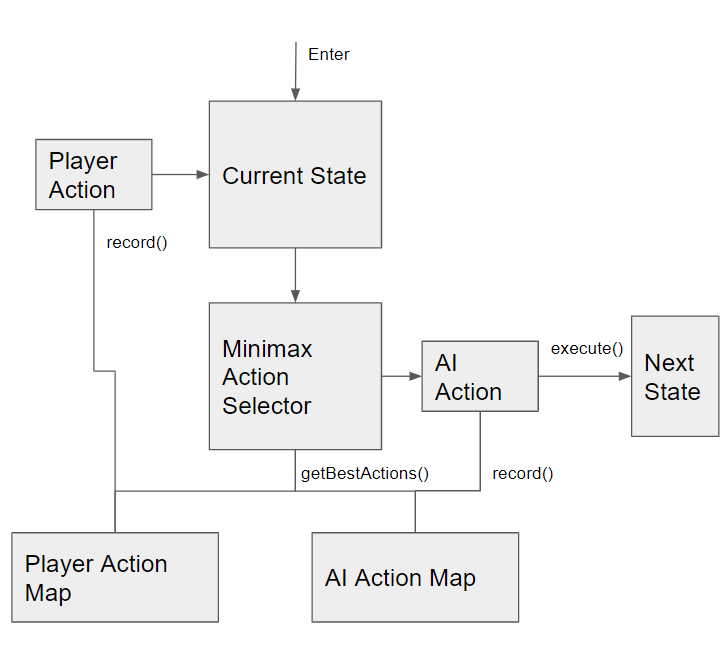
Applying Mini-Max to the AI Agent

To give the AI some higher level planning, I went towards applying the mini-max algorithm to it. However, mini-max is normally used in games that have finite state spaces with a finite set of actions because for it to make the best decisions it involves performing a full traversal of the entire action-state space to make a decision. This is problematic when we’re operating in a state space that is essentially infinite. To get around this, I spun out the mini-max traversal to a separate thread and put a timer on it so it just gives a best-effort decision periodically.

Minimax Algorithm applied to AI State machine

Similar to how the AI’s state and actions were recorded into a history, the player’s state and actions were also voxelized. However, since the player isn’t constrained to a specific set of actions, an action for the player is recorded as which state it transitioned to.

Player actions are stored as state transitions

When it all comes together, it creates very different behavior than the previous examples.

Behavior of AI using Minimax for decision making

Rather than fall for the same tricks, this AI made some new behavior and would start creeping up on the player before attacking. This behavior is interesting to observe, but it might be irritating for a player to deal with. In this version, the AI is a lot less predictable, which can seem unfair for a player. In the end though, it could probably be expanded to create a really engaging AI opponent.

Applying this back to Animations in VR

While this example is being applied to a simple game, there’s a lot of potential to bring this into a larger game. For example, this kind of agent system could be applied to a hand using IK bones to maneuver a sword for a melee attack. The overall goal would be encounters that seem less stiff and scripting, and more dynamic to the player’s interaction.

Code Location

Code available on GitHub here: https://github.com/PickledMonkey/Learning_AI_for_VR

Using Libre-Draw to Make 2D Animations

A long while back, I used to play “APB: Reloaded”. It was an MMO made by some of the folks behind Grand Theft Auto 3 back in the day. I never played it when it first came, but hopped in once it went free to play. On the surface, you’d think the game’s main hook would be around the shooting and driving mechanics as the core gameplay was a third-person shooter mixed with driving cars. However, the real draw of this game was the character customization. It’s the sort of system that lets you draw anything, but you did it by combining shapes together in a creative fashion. When you saw the stuff people made, it’d be inspiring to make something cool yourself.

APB Customization Tools.
Image by IRaulDuke. See all the awesome stuff people make at: https://forums.gamersfirst.com/topic/63-showcase-symbol-customization/

I started to dig into the game some more, and could spend hours making symbols and things to customize my character and car. Eventually, it was really the only reason I played the game, and it became a way I could make art like I never could before, so I began looking for a tool to draw art in a similar way.

Enter: Libre-Office Draw

I made that in Libre-Office Draw. It’s Jamming on Toast!

Libre-Office has a program for drawing diagrams, but in it, you can make whatever shape you want, and you can make all kinds of transformations to get what you’re looking for. I spent some time using it to just try and make some stickers to put on my computer case, but then I thought, what if I used this for making a character animation.

I mean, if everything is basic shapes, then it shouldn’t be too hard to just build the basic parts and shift everything around for each frame. So I thought, I’ll make a simple 2D character in Libre-Office Draw and adjust it for different animation frames.

Say hello to Boxer

Trying to do it manually

So, my first thought was, I’ll just manually adjust the character for each frame. Unfortunately, that was a real pain in the butt. The character I made only has a total of 11 shapes: head, neck, upper-arms, lower-arms, torso, thighs, calves. My first goal of making an idle animation ended almost as soon as I got started. I made a key frame, then two, then three, then realized I needed to smooth out the transitions between them. That’s where I realized it was never going to work. I couldn’t smooth out the frames manually, I just can’t eyeball how to adjust it to make it work. Not to mention, it’s incredibly tedious work. All y’all artists out there making animation frames, you heart goes out to you.

Two key-frames for an idle animation side by side. Smoothing the transition between them was too tedious for me.

Making a Plugin to Automate it

Turns out Libre-Office has a large framework for building plugins and extending the functionality of its programs. So, I figured, why not make a plugin that can try and interpolate the transformations between the two animation frames and generate the intermediate frames.

So it’s time for some math

Libre Office draw will store each shape as a collection of points with individual transformation matrices for each point or in the case of defined shapes (like a square or circle) there will be one transformation matrix for the entire shape. To get the shapes to interpolate properly, you need to break down the transformation matrix into it’s individual components, e.g. Translation, Rotation, Scale, and Shear and do the interpolation on those.

Cubic Spline Interpolation

For this part, originally thought I’d do some basic linear interpolation, but it made choppy transitions between key frames, so instead I switched to using a cubic spline. I wish I could say I was a cool dude who wrote his own spline function, but nope, I just grabbed what I could find on Google. Which happened to be the code here: https://gist.github.com/lecho/7627739

It works really well, 10/10 would recommend.

Breaking down a 2D transformation matrix

I’m writing this article a good while after I made this plugin, and while reviewing what I did, well, I made some mistakes.

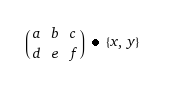
Here’s where all 2D transformations start. We’re trying to decompose the 2×3 matrix into it’s component pieces

Refer to the above transformation matrix layout, when I refer to specific values in the matrix, I’m referencing that.

Let’s start with what’s correct. Translation. No problems here. This is the easy one.

private void getTranslationVector(HomogenMatrixLine3 rowX, HomogenMatrixLine3 rowY, HomogenMatrixLine3 rowZ)
{        
    translationVector[x] = rowX.Column3;
    translationVector[y] = rowY.Column3;
}

Next let’s go onto rotation. Also works just fine. Note that this implies a counter-clockwise rotation. If we were measuring a clockwise rotation, then you would need to inverse the sign of ‘b’ (rowY.Column1). But this only works if there’s no shear perpendicular to the x axis. If there is, then this whole thing becomes a lot more complicated.

private void getRotationAngle(HomogenMatrixLine3 rowX, HomogenMatrixLine3 rowY, HomogenMatrixLine3 rowZ)
{
    rotationAngle = Math.atan2(rowY.Column1, rowX.Column1);
}

Now let’s figure out the scaling, and this is where things get trickier, and also where my errors started to slip in because nothing works when the shape has any kind of shear.

Let’s start with scalingVector[x]; it’s fine if there’s no shear. There’s an implication that, because our rotation angle was atan(d, a), a = r*cos(theta) and d = r*sin(theta). So, the magnitude of the vector [a,d] = sqrt(r * (cos^2(theta) + sin^2(theta)) = r. So what, you ask? Well, ‘a’ is also the x scaling value multiplied by cos(rotation). So, altogether, a=r*cos(theta)=scale(x)*cos(rotation) so, r = scale(x).

Now what about scale(y)? Since we’re doing a counter-clockwise rotation, e=scaling(y) * cos(rotation) and b = scaling(y) * -sin(theta). So if I just multiply and subtract cos and sin, then I can get scaling(y) = scaling(y) * (cos^2(rotation) + sin^2(rotation)).

private void getScalingVector(HomogenMatrixLine3 rowX, HomogenMatrixLine3 rowY, HomogenMatrixLine3 rowZ)
{
    scalingVector[x] = vectorMagnitude(rowX.Column1, rowY.Column1);
    scalingVector[y] = (rowY.Column2*Math.cos(rotationAngle)) - (rowX.Column2*Math.sin(rotationAngle));
}

private double vectorMagnitude(double xVal, double yVal)
{
    double magnitude = xVal*xVal + yVal*yVal;
    magnitude = Math.sqrt(magnitude);
    return magnitude;
}

So wait… what about shearing you ask. Well, this is where I failed when I was working on it. In fact, I noticed there was a comment in my code saying “Shearing is not working yet.” This is because I never bothered to break it all down and see the affect shearing has. If I did then I would notice the following:

a = scaling(x) * cos(rotation) + scaling(y) * shear(x) * -sin(rotation)
b = scaling(y) * -sin(rotation) + scaling(x) * shear(y) * cos(rotation)
d = scaling(x) * sin(rotation) + scaling(y) * shear(x) * cos(rotation)
e = scaling(y) * cos(rotation) + scaling(x) * shear(y) * sin(rotation)

At this point, I’m tired of messing around with it, and say whatever, who needs a shear anyway… And there’s a decent thread on how to break down a 2D transformation matrix that only shears on one-axis here: https://stackoverflow.com/questions/45159314/decompose-2d-transformation-matrix

Either way, even without shearing, at this point I’m able to test it out and see if it’s even worth continuing the effort.

Here’s how it turned out

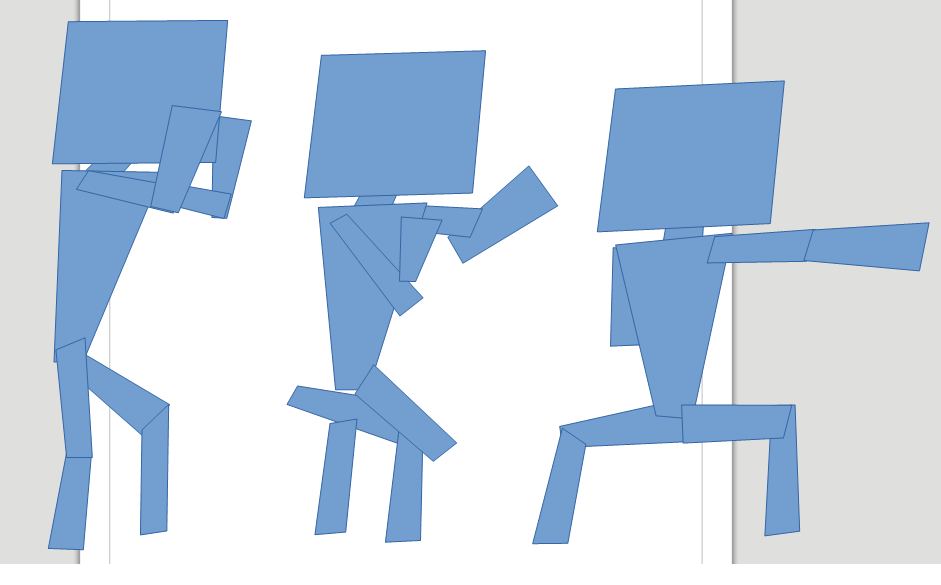
Long story short, it really depends on how you make each key-frame. For example, if you make a key frame by copying the previous frame and making small adjustments, then it works great, but if limbs are rotating 180 degrees and flipping orientation, then it gets problematic.

For example, the idle animation I started seems to interpolate fairly nicely.

Left and Right frames were made by hand. The middle frame was interpolated as the midpoint between the two

But then I tried to do some kind of cool spinning punch move…

Left and Right frames were made by hand. The middle frame was interpolated as the midpoint between the two.

That’s where everything broke down. The arms and legs all got disconnected, and it’s just a mess. However, there still is hope, because the shape of the limbs seem like they might be right, it’s just the positioning that’s all broken.

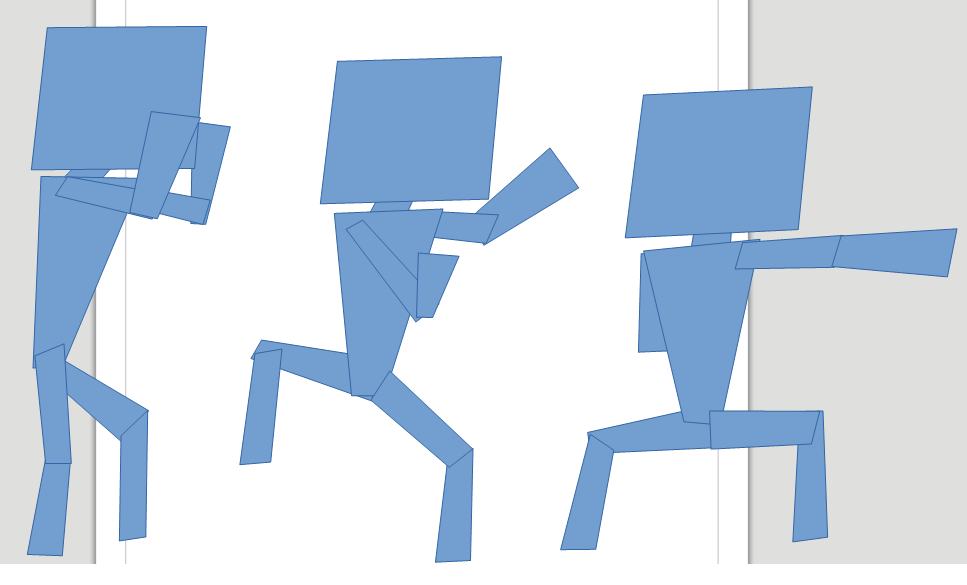
If I rearrange everything to be in the appropriate place then…

Left and Right frames were made by hand. The middle frame was interpolated as the midpoint between the two and adjusted slightly to keep everything in the right place.

It looks halfway decent now. I mean, it’s still a bad animation, but maybe this was just too big a jump and if I put a key frame in between I can get some better results. At least the only manual work I needed to do was move some shapes around which is a lot easier than doing the rotation and point manipulation of the shape itself.

All in all it’s a fun little experiment and I was actually kinda proud of the animations I made using it for this simple character. I can’t imagine making a complex character with this tool however, it’d be a lot of work, but then again, so is animation in general.

But anyways here’s how those two animations looked at the end of it all. I added a few more key frames to the punch and interpolated about 4-5 additional frames between the two using my plugin.

Idle Animation
Spinning Punch Animation

Conclusion

While it was a fun experiment, there’s a lot more work to be done if you ever wanted this to be viable. Honestly, it’d probably be easier to make a 2D skeleton and animations using Blender or something like that. The whole idea of bones, joints, and skeletons solves the problem of keeping things aligned, and game engines can take advantage of those to do their own animation blending without the need for sprite sheets.

Code and Stuff

Plugin code is available on GitHub here: https://github.com/PickledMonkey/ShapeInterpolator